What is Anthropic PBC Charge on Credit Card?

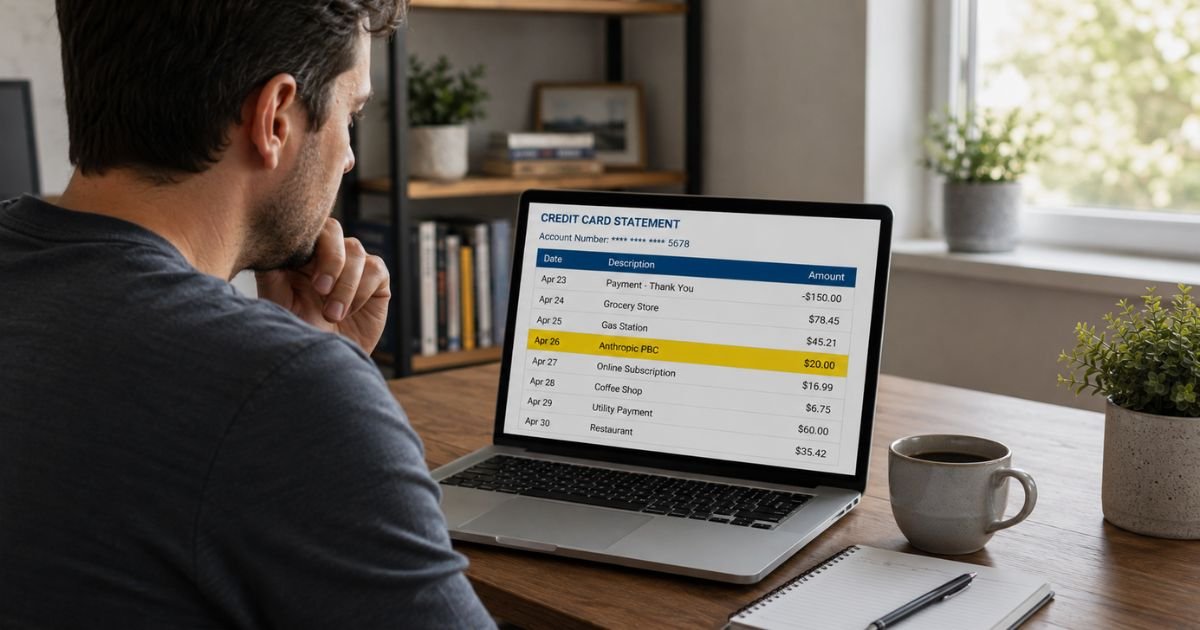
You check your credit card statement and spot a charge labeled Anthropic PBC. The name may not ring a bell right away, especially if you don’t remember signing up for anything under that exact title.
Anthropic PBC is the legal name of the company behind the Claude AI assistant. The charge is almost always for a paid Claude subscription or related service.
This guide explains what the charge means, the usual amounts, how to confirm it in your account, and what to do if you don’t recognize it.
Quick Answer
An Anthropic PBC charge on credit card is a legitimate payment to Anthropic, the company that makes Claude. It typically covers a Claude Pro subscription ($20 per month), a higher Max plan, a Team plan, or API usage.
Log into claude.ai, go to Settings > Billing to view invoices and manage or cancel the subscription. Contact Anthropic support or your card issuer if the charge is unauthorized.
What Is Anthropic PBC?
Anthropic is an AI research and safety company based in San Francisco. It develops the Claude family of AI models.
PBC stands for Public Benefit Corporation, the legal structure Anthropic uses. On credit card statements the charge often appears as “Anthropic PBC” rather than simply “Claude” or “Anthropic.”
This is normal. Many companies bill under their full legal name.
What Does an Anthropic PBC Charge Usually Cover?
Most consumer charges fall into these categories:
- Claude Pro – $20 per month or $200 per year (about $17 per month when billed annually). This is the most common individual paid plan.
- Claude Max plans – Higher tiers such as $100 or $200 per month for significantly more usage.
- Team plans – Starting around $25 per user per month for shared team access.
- API usage – Pay-as-you-go charges based on tokens consumed if you use Anthropic’s developer API.
Invoices are usually emailed with the subject line “Your receipt from Anthropic.” You can also view them inside your Claude account.
How to Confirm the Charge in Your Account
- Go to claude.ai and sign in with the email address linked to the subscription.
- Click your name or initials in the lower left and select Settings.
- Open the Billing section.
- Review invoices, the current plan, payment method, and next billing date.
If you subscribed through the iOS or Android app, the charge may appear through Apple or Google instead of directly as Anthropic PBC. In that case, manage it through your App Store or Google Play account.
Is the Anthropic PBC Charge Legitimate?
Yes. Anthropic is a well-known, established AI company. A charge under “Anthropic PBC” is the normal way their subscriptions and services appear on statements.
Some users have reported unexpected small charges, repeated billing attempts, or support delays in the past. These appear to be billing glitches rather than fraud in most documented cases. Always verify the charge against your own account activity.
What to Do If You Don’t Recognize the Charge
Follow these steps:
- Log into claude.ai and check the Billing section for matching invoices.
- Search your email for “Anthropic” or “Your receipt from Anthropic.”
- Ask anyone who shares the card or has access to your email whether they started a Claude subscription.
- If you find an active subscription you no longer want, cancel it in the Billing settings. Cancellation usually stops future charges, though you keep access until the end of the current period.
- If no matching account or invoice exists, contact Anthropic support through the official help center and report the charge.
- At the same time, notify your credit card issuer, especially if you suspect unauthorized use. Request a dispute if the charge is not yours.
Keep screenshots of invoices, emails, and any support conversations.
How to Cancel a Claude Subscription
Inside claude.ai:
- Go to Settings > Billing.
- Locate the active plan.
- Follow the cancellation prompts.
If you subscribed through an app store, cancel there instead. Confirm the cancellation and note the end date of the current billing cycle.
Common Mistakes to Avoid
- Assuming every unfamiliar company name is fraud without checking your Claude account first.
- Canceling only in the app while the web subscription continues (or vice versa).
- Ignoring small or repeated charges that may indicate a billing error.
- Sharing full card details with unofficial support links.
- Waiting too long to dispute an unauthorized charge with your bank.
Practical Tips
Turn on transaction alerts from your bank or credit card.
Review your Claude Billing page periodically if you have a paid plan.
Use a virtual card number for new AI subscriptions when your bank offers one.
Keep a simple list of active digital subscriptions so future charges are easier to match.
FAQs On Anthropic PBC Charge on Credit Card
Why does the charge say Anthropic PBC instead of Claude?
Anthropic is structured as a Public Benefit Corporation. Credit card statements often show the full legal entity name rather than the product brand.
How much is a typical Anthropic PBC charge?
The most common individual plan is Claude Pro at $20 per month (or $200 annually). Higher Max and Team plans cost more. API usage varies with actual consumption.
Can I get a refund for an Anthropic charge?
Refund policies depend on the plan and timing. Check your Billing settings or contact Anthropic support with the invoice details. Act relatively quickly for the best chance of a refund.
What if I see multiple small Anthropic charges?
Some users have reported repeated small authorization attempts or billing errors. Log into your account, review the invoices, and contact Anthropic support. Also notify your card issuer if the activity looks suspicious.
Conclusion
An Anthropic PBC charge on credit card is nearly always a payment for a Claude AI subscription or related Anthropic service. The most frequent amount is the $20 monthly Claude Pro plan, though higher tiers and API usage also appear under the same name.
Log into claude.ai, open Settings > Billing, and match the charge to an invoice. Cancel if you no longer want the service, or dispute it with Anthropic and your card issuer if it is unauthorized.
Checking the official account first resolves most questions quickly and keeps your finances clear.
Disclaimer: This article is for general informational purposes only and does not constitute financial, legal, or professional advice. Pricing, plan details, and billing practices can change. Always verify information directly in your Claude account and with your card issuer. If you suspect fraud, report it promptly to both Anthropic support and your financial institution.