What is Paddle Charge on Credit Card?

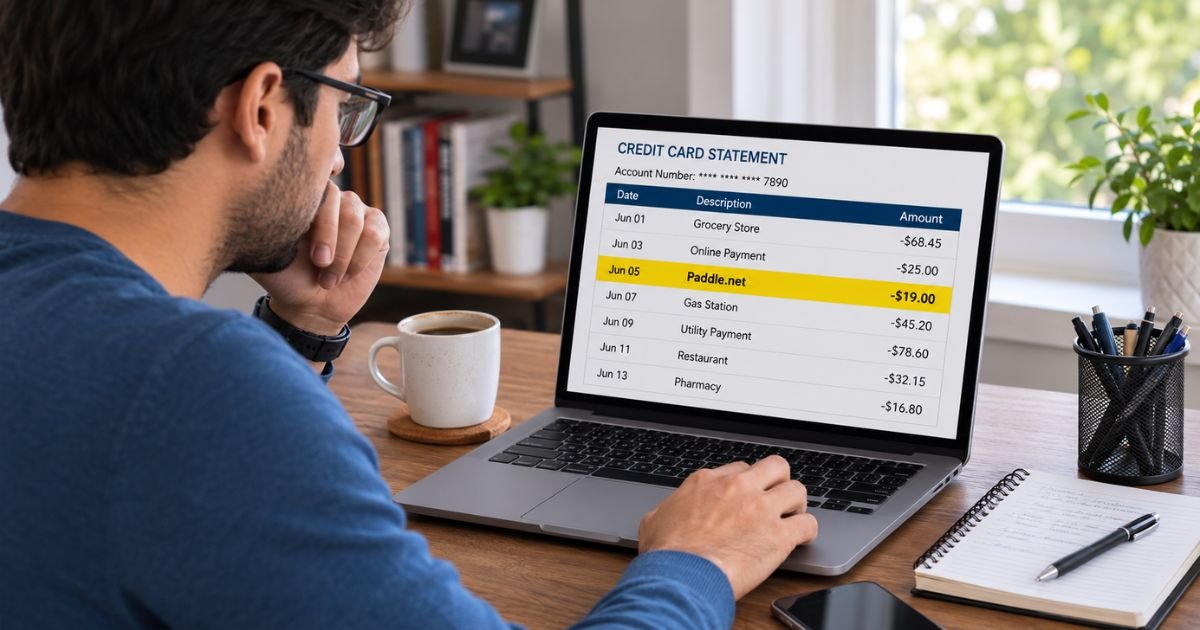
You check your credit card statement and see a charge from Paddle, Paddle.net, or something like PADDLE.NET * [Name]. You don’t remember buying anything from a company called Paddle, so it feels confusing or concerning.
This is a very common situation. Paddle is not usually the product you bought. It is the company that processed the payment for a software tool, app, or digital subscription.
This guide explains exactly what a Paddle charge means, how to find the specific product behind it, and what to do if you don’t recognize the charge.
Quick Answer
A Paddle charge on credit card almost always comes from a software purchase or subscription processed by Paddle as the Merchant of Record. Thousands of digital product companies use Paddle for payments.
Visit paddle.net to look up the exact transaction by email or card details. If it is unauthorized, request a refund through Paddle support and contact your card issuer if needed.
What Is a Paddle Charge on Credit Card?
Paddle (paddle.com and paddle.net) is a payment company that acts as the Merchant of Record for many software and digital product businesses.
When you buy or subscribe to software from one of those companies, Paddle handles the payment, taxes, and billing. Because of this, the charge appears under Paddle’s name on your statement instead of the software company’s brand name.
Common descriptors include:
- Paddle.net
- Paddle.com
- PADDLE.NET * [Product or Company Name]
- Paddle.com Market Limited
This setup is normal for many indie developers, SaaS tools, Mac and Windows utilities, note-taking apps, security software, and digital downloads.
Why Does the Charge Appear Under Paddle Instead of the App Name?
Paddle takes legal responsibility for the sale. It collects the money, handles sales tax or VAT in different countries, and manages refunds and compliance. The software developer focuses on the product while Paddle manages the money side.
This is why a charge for something like AdGuard, Alfred Powerpack, a productivity app, or another tool often shows only as Paddle on your statement.
How to Identify Exactly What You Were Charged For
The fastest way is to use Paddle’s own buyer tools:
- Go to paddle.net.
- Use the options to find your purchase, request a receipt, or contact support.
- Provide the email address used for the purchase and the last four digits of the card if asked.
- The system or support can show the product name, date, amount, and whether it is a one-time purchase or subscription.
Also search your email (including spam) for messages from Paddle or the software company around the charge date. Look for order confirmations or subscription notices.
Many people discover the charge is for a free trial that converted or a renewal they forgot about.
Is Paddle Legitimate?
Yes. Paddle is a real, established company that processes payments for thousands of software businesses worldwide. It is widely used by legitimate digital product companies.
In 2025, Paddle reached a settlement with the U.S. Federal Trade Commission related to certain past payment practices involving specific tech-support schemes.
The company paid a fine and agreed to stronger rules, including limits on processing payments for certain telemarketing tech-support services. This does not mean every Paddle charge is problematic. Most charges are for ordinary software and subscriptions.
Treat any unrecognized charge carefully, but the presence of the name “Paddle” by itself is not a sign of fraud.
What to Do If You Don’t Recognize the Charge
Follow these steps in order:
- Visit paddle.net and use the purchase lookup or support tools to identify the product.
- Check your email for confirmation messages from Paddle or the software company.
- Ask household members if they bought software or started a trial using the card.
- If it is a subscription you no longer want, cancel it through the paddle.net tools or the original software company’s account settings.
- If the charge is wrong or unauthorized, request a refund through Paddle’s support on paddle.net.
- If you cannot resolve it with Paddle, contact your credit card issuer, report the charge as unauthorized, and request a dispute or chargeback.
Act reasonably quickly. Card issuers and refund policies often have time limits.
How to Cancel a Paddle Subscription
Many Paddle-processed charges are recurring. To stop future billing:
- Use the cancel subscription options on paddle.net.
- Or log into the original software product’s website or app and manage the subscription there.
- Confirm the cancellation and keep any confirmation email or screenshot.
Canceling usually stops future charges, though access may continue until the end of the current period. Refunds for the current period depend on the specific product’s policy and timing.
Common Mistakes to Avoid
- Assuming the charge is fraud without first checking paddle.net.
- Looking only for the software brand name on your statement instead of Paddle.
- Sharing full card details with unofficial websites or random support numbers.
- Ignoring small recurring charges that can continue for months.
- Waiting too long to contact Paddle or your card issuer.
Practical Tips to Prevent Surprise Charges
Turn on transaction alerts from your bank or credit card.
Review your statements monthly and search for “Paddle.”
Be careful with free trials of software and note the end date.
Keep a simple list of active digital subscriptions.
Use virtual card numbers for new software trials when available.
FAQs On Paddle Charge on Credit Card
Why does my statement say Paddle instead of the app I bought?
Paddle acts as the Merchant of Record. It processes the payment and appears on the statement so the software company does not have to handle global taxes and billing itself.
How can I find out which product the Paddle charge is for?
Go to paddle.net and use the purchase lookup or support tools. Provide your email and card details as requested. You can also search your email for Paddle receipts.
Can I get a refund for a Paddle charge?
Yes, in many cases. Use the refund request tools on paddle.net. Eligibility depends on the product, timing, and Paddle’s or the seller’s refund policy. Act promptly.
Is it safe to enter my details on paddle.net?
Yes. paddle.net is Paddle’s official buyer support site. Use only the official domain and avoid third-party sites that claim to help with Paddle charges.
Conclusion
A Paddle charge on credit card is nearly always a payment for software, a digital download, or a subscription processed by Paddle as the Merchant of Record. The product name often does not appear on the statement, which is why the charge can look unfamiliar.
Start at paddle.net to identify the exact purchase or subscription. Cancel anything you no longer want and request a refund if the charge is incorrect.
If you still cannot resolve it, contact your card issuer. Checking paddle.net first solves the mystery for most people and keeps the process simple and direct.
Disclaimer: This article is for general informational purposes only and does not constitute financial, legal, or professional advice. Payment descriptors, company practices, and policies can change. Always verify details directly with Paddle through official channels (paddle.net or paddle.com) and with your card issuer. If you suspect fraud, report it promptly to both parties and consider filing a report with the FTC if appropriate.