What is 150 Greenwich St Charge on Credit Card?

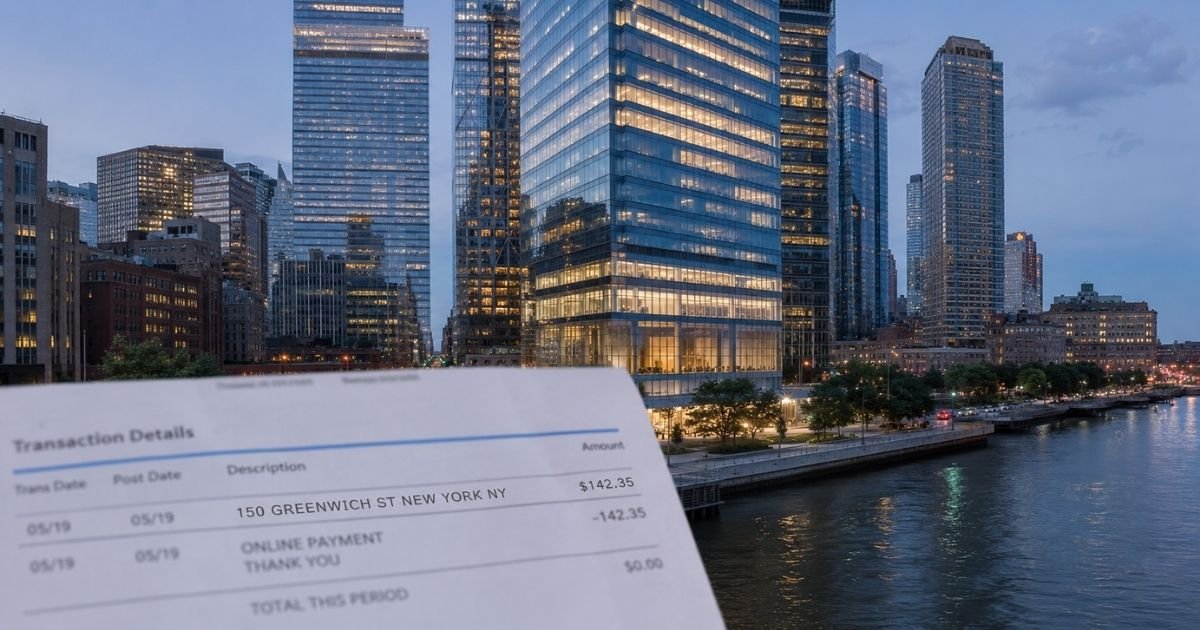
A 150 Greenwich St charge on credit card can feel confusing if you do not recall signing up for anything. Unfamiliar charges are often legitimate. This guide explains what the line usually means, how you can check it, and what to do next.
What the 150 Greenwich St Charge Typically Means
150 Greenwich Street is the street address of 4 World Trade Center in New York, NY 10007. It is a large multi-tenant office tower in the rebuilt World Trade Center complex.
Your bank or card issuer may print only the address instead of a full company name. That happens when a merchant account is registered there, when the processor sends limited text, or when the statement truncates the name.
The charge itself is generally from a tenant, a payment processor tied to that address, or a nearby service in the complex. It does not automatically prove which company billed you.
Spotify USA lists 4 World Trade Center, 150 Greenwich Street, 62nd Floor, as its New York office. A matching monthly amount can point to a Premium plan. The address alone does not confirm Spotify. Many other firms occupy the same building.
Other tenants have included city offices, insurers, financial firms, and companies that later subleased space. Retail and dining in the wider World Trade Center and Westfield complex can also process cards. Parking near the site is another possible source.
Look at the full wording on your statement. Common variations include 150 GREENWICH ST, 150 GREENWICH ST NEW YORK NY 10007, POS DEBIT 150 GREENWICH ST, and 4 WTC NEW YORK NY. A line that also says SPOTIFY is a stronger clue than the address by itself.
How to Identify Who Charged You
Start with the exact text, date, amount, and whether the charge is pending or posted. Note if it is coded as a card-present purchase or an online or recurring payment.
Open your bank or card app and tap the transaction. Issuers sometimes show a fuller merchant name, city, category, or phone number that the paper statement hides.
Compare the amount and date with your own records. Check email receipts, subscription emails, and apps you use. Ask anyone else who is an authorized user on the card.
If the amount is close to a current Spotify Premium price, log in at spotify.com and review payment history and saved cards. Individual, Duo, Family, and Student plans have different monthly rates that can change. Prices vary by plan and billing cycle.
If nothing matches, call the number on the back of your card. Ask the issuer for the complete merchant name, merchant category code, phone number on file, and whether the charge is recurring. That information is typically more reliable than guessing from the address.
Common Reasons You See This Charge
You may have paid a subscription whose billing account uses the 4 WTC address. You may have shopped or eaten at a retailer or restaurant in the World Trade Center area.
You may have paid for parking near 4 World Trade Center. You may have paid an insurer, financial firm, or other tenant that processes cards from that location.
A family member or roommate may have used a saved card. A pending authorization can later post under a slightly different description.
None of these reasons is guaranteed. Your specific charge depends on the merchant that processed it.
What to Do If You Do Not Recognize the Charge
Do not ignore it. Gather the statement line, amount, date, and last four digits of the card.
Review recent travel, dining, apps, and family accounts first. Many “mystery” charges turn out to be a forgotten subscription or a purchase someone else made with your permission.
Contact the merchant only through official channels after you know who it is. For Spotify, use the help pages on spotify.com. The company generally does not offer phone support for billing.
If you still cannot identify it, report it to your card issuer. Ask them to investigate. You can usually dispute an unauthorized charge. Time limits vary by issuer, so act soon. Federal rules often give you a window of about 60 days from the statement date, but confirm with your bank.
Lock the card in your app if you suspect fraud. Watch the account for other strange activity. Change passwords on related services and turn on alerts.
Canceling a subscription is separate from disputing a past charge. Cancel first if you no longer want the service, then ask about any refund. Refunds are not automatic and depend on the merchant’s policy and timing.
How to Reduce Surprise Address-Only Charges
Save digital receipts. Turn on transaction alerts from your issuer.
Review statements every month. Keep a simple list of recurring subscriptions and the card they use.
Use virtual card numbers or single-use numbers when a site offers them. That can make future charges easier to match.
If a company lets you choose how the charge appears, pick the option that shows the brand name, not only a street address.
FAQs On 150 Greenwich St Charge on Credit Card
Q: Is a 150 Greenwich St charge on credit card always Spotify?
A: No. Spotify USA has an office at 4 World Trade Center, 150 Greenwich Street. The address alone does not prove the charge is from Spotify. Confirm with the amount, your Spotify payment history, and extra merchant details from your issuer.
Q: Is the 150 Greenwich St charge legitimate?
A: It is typically a real merchant transaction tied to 4 World Trade Center or a processor using that address. Legitimacy for your account still depends on whether you or an authorized user approved it. Check the details rather than assuming fraud or assuming it is fine.
Q: Why does my statement show only the street address?
A: Card networks and processors often send short text. Banks may display the registered business address when the merchant name is long or missing. That is a common formatting issue, not proof of a problem by itself.
Q: How do I dispute a 150 Greenwich St charge I do not recognize?
A: Call the number on the back of your card or use the issuer’s dispute form in the app. Give the date, amount, and exact descriptor. Explain that you do not recognize the merchant. Follow the issuer’s steps and keep copies of what you send.
Conclusion
A 150 Greenwich St charge on credit card usually points to 4 World Trade Center in New York, not to one single brand. Check the full descriptor, amount, and your own accounts first.
Ask your issuer for the real merchant name if you still cannot place it. Most of these lines are ordinary business charges. A quick review generally tells you whether to keep the service, cancel it, or dispute it.
Disclaimer: This article is for general information only. It is not financial, legal, or tax advice. Merchant names, billing descriptors, prices, and refund rules vary and can change. Confirm any charge or cancellation with the company that billed you and with your card issuer.