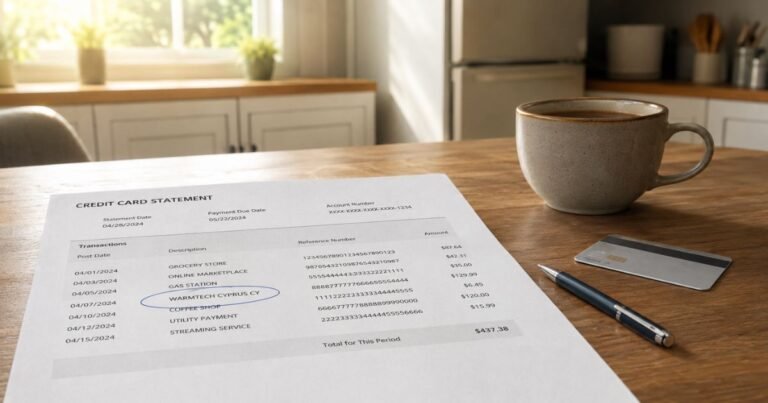
What is Nano Banana Charge on Credit Card?

A Nano Banana charge on your credit card could relate to an AI image-generation website or subscription that uses the Nano Banana name. Google uses Nano Banana as the name of its Gemini image models, but a card descriptor with those words is not automatically a Google charge.
Several unrelated websites may provide image-editing services using the same phrase. Here is how to identify the actual seller, distinguish Google billing from third-party services, and stop any unwanted plan.
What Is Nano Banana Charge on Credit Card?
Nano Banana is the product nickname Google uses for some Gemini image creation and editing models. Google introduced the original Nano Banana in 2025 and launched Nano Banana 2 in February 2026.
Developers can access supported Gemini image models through Google’s API products, while consumers may use image features through Gemini and other Google applications. The actual billing platform depends on which service the customer used.
A website that advertises Nano Banana images or credits may be an independent reseller or app using the same popular name. Its merchant of record, subscription terms, and customer support can differ entirely from Google.
Do not assume a specific charge is a Google AI Pro renewal, Gemini API payment, or image-credit pack without checking the exact merchant name and a corresponding receipt.
Why Nano Banana May Appear After an AI Image Purchase
You may have signed up for an online image editor offering text-to-image creation, photo transformations, or downloadable image credits. Such sites can charge one time or operate recurring plans.
Some third-party services market themselves around the Nano Banana model name. Their websites and checkout processors may not share Google’s billing relationship, even if a user describes the product simply as Nano Banana.
If you used Google AI Studio or a developer API, check the relevant Google Cloud or Gemini API billing project. An API-based payment can have different usage charges than a consumer subscription.
If you subscribed through an Android or iOS app, examine Google Play or Apple subscriptions and the paying account. An app-store receipt may use a platform descriptor rather than Nano Banana.
An unfamiliar NANO BANANA transaction does not prove which model ran or whether any image was generated. Ask the issuer for merchant website, category, and location before deciding.
Google’s Nano Banana Models Versus Third-Party Sites
Google’s own announcements identify Nano Banana as the nickname for models in the Gemini family. That is a product identity, not a universal payment company.
Independent developers can build image tools around available model APIs. A customer may therefore purchase service access from the app developer rather than from the underlying model provider.
Look closely at the checkout domain and confirmation email. A link to a Google blog article on the service’s marketing page does not mean Google collected the card payment.
Google’s API pricing is based on usage and model specifications, whereas some external image apps sell a pack of credits or access for a recurring period. Do not substitute one service’s price for another.
If your receipt names an independent business, use its own verified billing help. Do not send the payment information to unrelated websites that promise to identify every Nano Banana charge.
Find an AI Image Subscription or Order
Search email for Nano Banana, Gemini, AI image, generated images, trial, credits, invoice, and the exact payment amount. The original receipt should identify the service domain or payment processor.
Check any AI image services you actually used and inspect their profile, billing, usage, and renewal settings. Compare credits purchased with credits consumed and the charge date.
If you paid through Apple or Google Play, open subscription and purchase history for the account used at checkout. A web subscription will usually not appear as an app-store subscription.
Look at the difference between introductory and renewal pricing. A small test payment may have been followed by a larger membership charge under disclosed terms, but that must be demonstrated by the accepted offer.
If the site cannot locate the order, request issuer details for the real merchant. Avoid entering full card credentials into a second unknown website while trying to cancel.
Canceling and Requesting a Refund
For a confirmed app-store plan, cancel renewal through the corresponding Apple or Google Play account and keep the confirmation. For a web plan, use the actual provider’s authenticated account controls.
Deleting generated pictures, uninstalling an app, or closing a browser does not itself terminate an agreed renewal schedule. Verify the membership status and the next planned payment date.
Refund eligibility for image credits can depend on whether the credits were consumed, the service’s terms, and local laws. Do not assume Google’s policies cover a purchase handled by a separate company.
If the merchant charged a different amount than disclosed, request an itemized invoice and retain a screenshot of the checkout agreement for a correction or bank dispute.
If no authorized person bought AI image services, report the posted debit to the issuer promptly. The popularity of the Nano Banana name is not proof the charge is legitimate.
How to Verify the Complete Credit Card Transaction
Open the charge in your credit card issuer’s official app. Copy the full statement label, amount, posted date, and any website, telephone number, or merchant city that appears. A short merchant name can be much less useful than these additional details.
Check whether the amount is pending or posted. A temporary authorization may disappear or settle for a different amount, so two visible lines do not prove that the merchant collected two completed payments.
Search your email, purchase histories, and payment wallets for the exact amount and approximate order date. Ask authorized users whether they recognize it, but do not access accounts you do not own or have permission to manage.
If the charge remains unclear, contact the card issuer using the number on your card and request the full merchant of record, payment channel, and available transaction reference. A bank may have more information than a short statement display.
Keep any matching order receipt, terms, subscription confirmation, and correspondence. The documents can help distinguish an authorized purchase under an unfamiliar name from a billing mistake or unapproved payment.
What to Do If the Charge Is Wrong or Unauthorized
If you recognize the purchase but the total is wrong, request an itemized invoice from verified merchant support. Compare the amount with disclosed taxes, exchange-rate differences, shipping fees, and any trial-to-renewal terms.
If nobody authorized the posted transaction, notify the issuer promptly through its authenticated channel. Ask whether to lock or replace the card and what documents it needs for a formal investigation.
For many US credit card billing errors, the Consumer Financial Protection Bureau advises submitting written notice within 60 calendar days after the first statement containing the mistake was sent. The billing-error address may differ from the payment address.
A chargeback begins an investigation rather than guaranteeing a refund. Preserve the case number, copies of your statement, merchant replies, and the issuer’s instructions for paying any undisputed balance.
Do not provide full card numbers, security codes, account passwords, or one-time bank verification codes to an unfamiliar merchant-identification site. Use the provider’s verified billing portal or your issuer.
Refunds, Recurring Payments, and Prevention
A merchant-approved refund can post as a separate credit, leaving the original debit visible. A released authorization hold may simply disappear without a credit, so check the final status before deciding money is missing.
Repeated entries might represent subscription renewals, multiple legitimate purchases, or an error. Match each one with an actual agreement and receipt rather than assuming the business automatically renews every customer.
Cancel a confirmed recurring plan through the company or app store responsible for billing. Uninstalling an app or replacing a card does not necessarily terminate the original agreement.
Turn on transaction notifications when available and keep a searchable copy of receipts. Reviewing payments regularly makes it easier to identify a merchant’s legal name or processor on your statement.
Continue to monitor your next statement after a cancellation or dispute. Save any new transaction IDs and provide them to verified support if a problem reappears.
Official Sources and Important Verification Limits
Google describes Nano Banana as a family of image-generation and editing models available through supported Gemini products and developer tools. Google publishes pricing for Gemini API usage. That establishes the product’s existence, not that every NANO BANANA statement descriptor belongs to Google. Independent websites can also use the words Nano Banana in their names.
Review Google’s official description of Nano Banana image models for the relevant official information. See also our guide to unfamiliar statement charges and the CFPB’s official billing-error guidance. These sources cannot confirm who authorized an individual card payment.
FAQs About Nano Banana
Q: Is Nano Banana a Google product?
A: Yes. Google uses Nano Banana as the name of Gemini image models, but a card charge under that name may belong to an independent business.
Q: Does Nano Banana always mean a monthly subscription?
A: No. It could relate to an API, image-credit purchase, app plan, or unrelated merchant. Check your invoice.
Q: How can I stop a Nano Banana charge?
A: Identify the real billing platform from the receipt, then cancel any confirmed recurring plan through that provider.
Q: What if Google has no matching billing record?
A: Ask the bank for the complete merchant name and investigate third-party purchases or unauthorized card use.
Conclusion
Nano Banana on a credit card statement needs to be matched to the real merchant, an actual invoice, and the transaction details provided by the issuer. The model name and the business collecting the money must be verified separately.
When the payment is recognized, use the business’s genuine billing tools for cancellations or corrections. When nobody approved a posted payment, contact the issuer promptly.
Disclaimer: This article provides general information, not financial or legal advice. Billing descriptors, payment terms, refund eligibility, and cardholder rights vary. Verify details with the actual merchant and your card issuer.