What is Warmtech Charge on Credit Card?

A Warmtech charge on credit card can feel confusing if you don’t recall signing up for anything. That reaction is common. Unfamiliar statement names are often legitimate billing labels, not instant proof of fraud.
This guide explains what the Warmtech charge on credit card usually is, how to match it to a service, and what to do if you want it stopped.
What Is a Warmtech Charge on Credit Card?
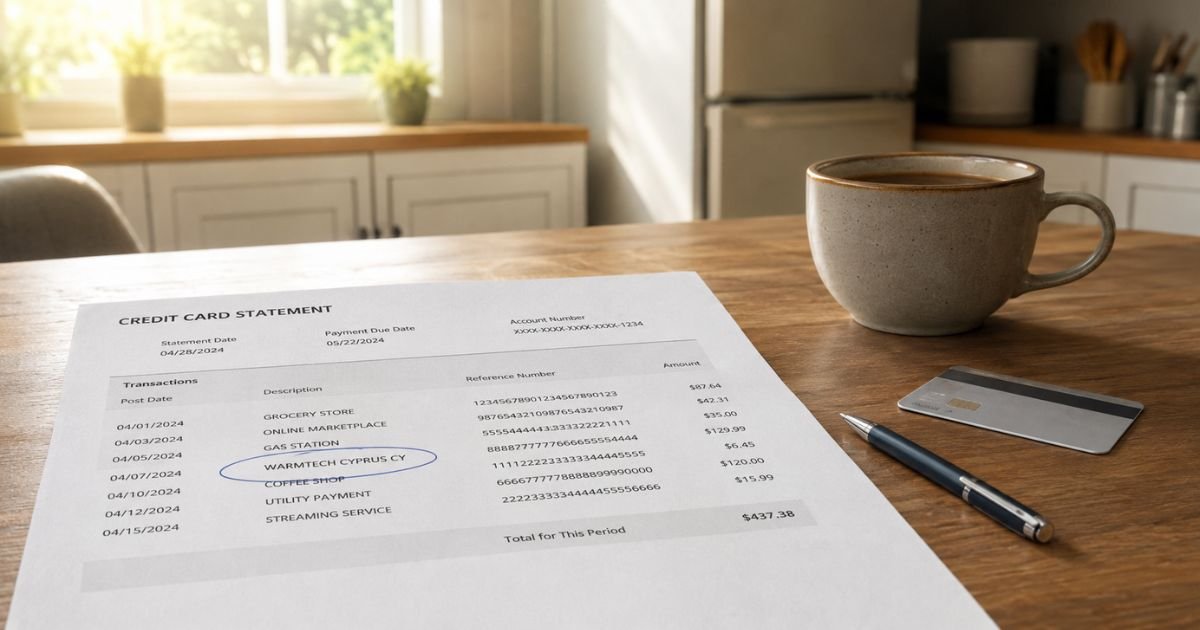
A Warmtech charge on credit card is typically a merchant descriptor. That is the short name your card issuer prints next to a purchase. It identifies who processed the payment, not always the website you remember visiting.
In many consumer reports, the name traces to Warmtech Ltd, a Cyprus company registered as HE 418620. Public registry records list it as active and give a Limassol address on Spyrou Kyprianou.
Warmtech Ltd has also filed U.S. trademark applications for LOVESCAPE and MYCLUB. That supports a link between the company and those brand names.
The strongest public product link is Lovescape, an online AI companion platform at lovescape.com. The site’s own help pages say payments may appear with a neutral bank-statement description. Independent testers have reported seeing Warmtech or similar wording instead of “Lovescape.”
Charge-explainer sites also connect Warmtech Ltd to a creator-subscription brand often written as my.club. Trademark filings support a MyClub brand under the same company.
I cannot independently confirm every website that may bill under the Warmtech name. If your emails point to a different site, treat that site as the real merchant.
How the Charge Usually Shows Up
Your statement may not say “Warmtech” in one clean way. Issuers shorten names and add codes.
People commonly report lines such as:
| Statement text you may see | What it generally means |
|---|---|
| WARMTECH | Company or processor name only |
| WARMTECH CYPRUS CY | Warmtech Ltd, with Cyprus as the country code |
| WARMTECH LTD | Legal company name |
| WARMTECH SERVICES or WARMTECH PAYMENT | Processor-style wording |
| UPG – WARMTECH | A variation some Lovescape users have reported |
Prefixes like CHKCARD, POS PUR, PENDING, or PRE-AUTH usually describe how the bank posted the swipe. They do not change the merchant.
Amounts vary by plan and date. Consumer reports often mention recurring monthly-style totals in a roughly $10 to $30 range.
Some plans bill a larger amount up front for several months. Do not treat any dollar figure as official pricing. Check the receipt or the site you used.
Why You May Not Recognize It
Lovescape publicly describes “discreet billing.” That means the statement is designed to look like a generic digital purchase. It is not supposed to name an AI companion or adult content.
Trials and auto-renewals add to the confusion. Lovescape’s terms say a subscription typically renews unless you cancel in the account.
After you cancel, the current paid period generally stays active. New charges should stop after that period ends.
Other common reasons include a forgotten checkout, a shared card, or a family member’s signup.
A rarer cause is an unauthorized charge. You cannot tell those apart from the name alone. You have to match the date, amount, and any emails.
Do not mix this up with WeatherTech car mats. That is a different company.
Separate businesses also use Warmtech-style names for floor heating or car-seat heaters. Those usually show a store, city, or product context, not “Cyprus CY.”
How to Confirm Whether the Charge Is Yours
Start with your own records. Search your email and spam folder for “Warmtech,” “Lovescape,” “MyClub,” “my.club,” “subscription,” and the exact dollar amount.
Look at the charge date. Think about any site where you entered a card for a trial, chips, tokens, or premium chat. Check phone wallets, browser password managers, and app stores too.
If you find a Lovescape account, log in at lovescape.com. Open your profile, then Subscription or Account Settings. Compare the plan price with the statement line.
Lovescape’s help center says you manage membership there. Support emails published by the company include help@lovescape.com.
If you cannot find any account, treat the charge as unrecognized. That does not automatically prove fraud. It does mean you should move to cancel-or-dispute steps soon.
How to Cancel a Warmtech Subscription
Cancel at the service that enrolled the card when you can. That is usually faster than waiting on a bank.
For Lovescape, log in, open your profile icon, and go to Subscription or Account Settings. Choose cancel and save a screenshot of the confirmation. The site says you can cancel anytime. Access typically continues until the paid period ends.
If emails mention another branded site, use that site’s account billing page the same way. Search the message for “manage subscription” or “cancel.”
Also check Apple and Google if you subscribed inside an app. Card statements still show a processor name even when an app started the signup. App Store and Google Play have their own subscription lists.
Canceling generally stops future renewals. It does not always refund the latest payment. Refund rules vary by merchant, plan, and how long ago you paid.
Ask the service in writing if you want a refund review. Do not assume one.
If you cannot log in, email the service from the address on the receipt. Include the charge date, amount, last four card digits, and a clear request to cancel renewals.
How to Dispute an Unrecognized Charge
Call the number on the back of your card if you did not authorize the charge. Ask the issuer to explain the merchant and start a dispute if the charge is wrong.
You can typically request a block on future payments from that merchant. Ask whether a replacement card is safer if the number may have been reused.
In the United States, billing-error disputes on credit cards are generally time-sensitive. Many issuers expect you to write or file within 60 days after the statement that first showed the charge.
Your card agreement controls the exact process. Follow your bank’s steps and keep copies.
Be ready with:
- The exact statement wording
- The date and amount
- Whether the charge repeated
- Any emails or screenshots
- Whether anyone else uses the card
Stay factual. Say you do not recognize the Warmtech charge on credit card and want it investigated. Do not invent a story about the merchant.
A dispute is not a guaranteed refund. The bank reviews evidence from both sides. Outcomes vary by issuer.
Other Companies Named Warmtech
The same short name appears in other industries. Warmtech.net describes automotive seat heating products.
Australian Warmtech pages describe underfloor heating kits. Those businesses are not the same as Warmtech Ltd in Cyprus based on public records.
If your charge includes a store city, auto parts wording, or a large one-time hardware total, it may belong to one of those other firms.
Match the location and amount before you cancel a digital subscription.
When the line includes Cyprus or repeats monthly at a subscription-like price, the Cyprus billing company is the more typical match for U.S. card statements.
How to Avoid Surprise Recurring Charges
Turn on transaction alerts in your bank app. A same-day ping is easier to trace than a statement you open weeks later.
Use virtual card numbers when your issuer offers them for trials. You can shut off that number without replacing your main card.
Read the checkout screen for auto-renew language. Neutral billing is a feature some adult and companion apps advertise on purpose.
If privacy matters to you, that can be intended. If shared statements matter more, it can create this exact problem.
Review subscriptions once a month. Search email for “receipt,” “renew,” and “membership.”
FAQs On Warmtech Charge on Credit Card
Q: Is a Warmtech charge on credit card a scam?
A: Not automatically. Warmtech Ltd is a real Cyprus company, and Lovescape documents neutral statement text for its paid plans. The charge can still be unwanted if you forgot a trial or never meant to subscribe. Treat repeated unknown charges as a problem to verify, not as proof by itself.
Q: Why does it say Warmtech instead of the website I used?
A: Card networks print a merchant descriptor, which may be the legal or processing name. Lovescape says it uses discreet billing so the statement looks like a generic digital service. That is why the site name may never appear.
Q: How do I stop future Warmtech charges?
A: Cancel inside the original account first, then confirm no renewal date remains. If you cannot find the account, call your issuer, dispute unrecognized charges, and ask to block that merchant. Watch the next statement to confirm the charges stopped.
Q: Will I get a refund?
A: Maybe, but there is no universal promise. Lovescape’s public terms generally treat the current paid term as already provided after cancelation. Banks may refund unauthorized charges after a review. Policies vary by issuer and merchant, so ask both in writing and keep records.
Conclusion
A Warmtech charge on credit card usually means a processor or company name printed instead of a familiar website. For many U.S. cardholders, that name lines up with Warmtech Ltd in Cyprus and digital subscriptions such as Lovescape.
Start with email and account login. Cancel the membership if it is yours. Call your card issuer if it is not. Either path is manageable once you know the descriptor is a billing label, not a mystery store.
Disclaimer: This article is for general information only. It is not financial, legal, or tax advice. Merchant names, refunds, and dispute rules vary by company and card issuer. Verify account-specific questions with the merchant and your bank before you act.