What is Curb Mobility Charge on Credit Card?

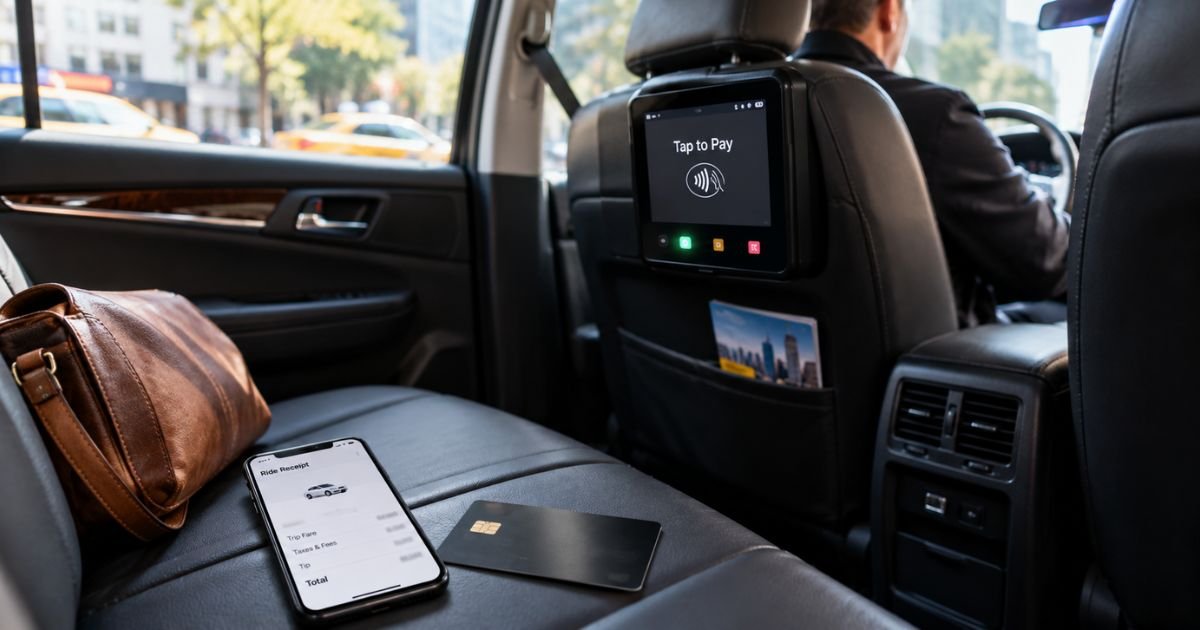
A Curb Mobility charge on credit card can feel confusing if you don’t recall opening a ride app. The name does not sound like the yellow cab you stepped into.
Unfamiliar taxi charges are often legitimate. Curb processes card payments for many licensed cabs, even when you never download the app. This guide shows you how the line usually appears, how to match it to a ride, and what to do next.
What a Curb Mobility Charge on Credit Card Means
Curb Mobility LLC, often called Curb, runs a U.S. taxi platform. You can book a licensed cab in the Curb app. The company also puts credit card machines in the back seats of taxis across many cities.
That second role is why the charge surprises people. Official Curb help says you will see a Curb charge when you pay on one of those machines, even with no Curb account.
Curb is not the same as Uber or Lyft. You are generally paying a regulated taxi fare through Curb’s payment system. The driver works for a taxi fleet. Curb is the name your bank prints.
The company is based in Long Island City, New York. Statement text may show a city code instead of the brand you remember.
How the charge usually appears
Your bank shortens the merchant name. Common lines include CURB MOBILITY, CURB SVC TAXI NEW Y, CURB SVC TAXI LONG ISL, CURB TAXI NYC, CURB APP PAYMENT, and CURB PAIR & PAY.
NEW Y typically points to New York. LONG ISL or LONG often points to Long Island. QUEEN, GLEN, NEW H, and LV can mark other local taxi zones. CURB SOS AUTO APRIVA may include an older payment-processor tag.
Prefixes like PENDING, POS PUR, or CHECKCARD are bank labels. They are not a second company.
Pair & Pay means you typed the cab’s code into the Curb app and billed the card on file. App Payment generally means you booked or paid inside the app.
Two similar amounts on the same day can still be two real rides. Metered trips can land on the same total. Check receipts before you assume a double charge.
Why you might see a Curb Mobility charge
The most common reason is a taxi ride you paid by card. You tapped or inserted the card in the back seat. You used Pair & Pay. Or you booked in the Curb app.
The total is typically the meter, plus tip, plus local extras. Official Curb terms list examples such as tolls, sales tax, and regulatory surcharges. A base service fee, reservation fee, cancellation fee, or no-show fee may also apply on app bookings. Exact add-ons vary by city and ride type.
New York City taxis can include required surcharges on almost every trip, whether you street-hail or use the app. Those extras can make the card total higher than the number you glanced at on the meter.
A pending line can appear when you request a ride in the app. Official Curb pages say that hold is not a final charge. It is voided when the trip is paid at the end or when the ride is canceled. Curb says most banks release the hold in 3 to 5 business days. Your issuer can take longer.
You may also see a charge after a hotel or venue hailed a cab for you. Some lobby tools book a taxi that still processes the card through Curb hardware.
A saved card in the app can be charged if someone else used your phone. A family member’s airport taxi can post days later if the trip was reserved in advance.
This is usually not a monthly subscription. Repeat charges mean repeat rides, a hold that has not dropped, or a card still saved for future trips.
Match the charge to a ride
Write down the date, amount, and exact descriptor. Then think about taxis that week. Curb machines are common in large U.S. cities, including New York.
If you use the Curb app, open ride history and receipts there. Compare pickup time and total.
If you paid in the cab and never used the app, look for a paper receipt or an email receipt. The printed slip may list a service fee that the screen did not highlight. Keep that receipt.
Check calendar notes, hotel folios, and flight days. Airport runs and late-night drops are easy to forget by the time the statement arrives.
Ask anyone who shares the card. A spouse, teen, or coworker may have paid a taxi on your card.
If two pending lines appear, one may be the hold and one may be the final fare. Wait for both to settle before you add them together.
Cancel a ride or stop future charges
Curb is a per-ride service, not a typical membership. There is no single “unsubscribe” that blocks every taxi machine in the country.
To cancel an app request, use the Curb app as soon as you change your mind. Official terms say a cancellation fee may apply after a driver accepts. A scheduled booking canceled less than 60 minutes before pickup may also draw a fee. A no-show fee may apply if you do not board in time. Amounts can vary, so read the prompt in the app.
A voided hold is not an instant refund to spend. Your bank generally releases it in a few business days.
To stop app billing, remove the card in the Curb Payments settings. That does not stop in-cab machines. If you swipe a card in a Curb taxi later, Curb can still appear on the statement.
Deleting the app does not erase a completed fare that already posted.
Curb’s rider terms say payments for rides booked or paid through the service are non-refundable by Curb. You may still have dispute rights with your card issuer under your card agreement.
What to do if you do not recognize it
Stay calm and work in order. Match the date to a taxi, airport, or hotel stay. Check the Curb app and any paper receipt.
If the ride is real but the total looks wrong, contact Curb in writing and keep copies. Official rider pages point app questions to support@gocurb.com. In public replies, Curb has also directed in-cab receipt questions to cs@gocurb.com. Include the date, amount, last four card digits, city, and a photo of the receipt.
Curb has said it does not offer rider support by phone. Numbers you find online may be driver dispatch or outdated office lines. Email is the path the company publishes for riders.
If Curb confirms no ride, or you get no useful answer, call your card issuer. Ask whether the line is pending or posted. For a posted charge you did not authorize, you can typically file a dispute. Deadlines vary by issuer.
Watch the next statement. A dropped hold should disappear. A real fare will post once.
Do not confuse Curb Mobility with other “Curb” businesses. Parking subscriptions on unrelated sites are not this merchant. Match the taxi wording on your statement.
FAQs On Curb Mobility Charge on Credit Card
Q: Why do I have a Curb Mobility charge if I never used the Curb app?
A: Official Curb help says the company also supplies backseat card machines to taxi fleets. Paying in the cab on that machine generally bills as Curb, even with no account. Think back to any recent taxi, not just app rides.
Q: Is a pending Curb charge a real payment?
A: Usually not yet. Curb says a temporary hold is placed when you request an app ride to confirm the card works. The hold is voided when the trip is paid or canceled. Most banks release it in 3 to 5 business days, though your issuer may differ.
Q: How do I cancel so Curb Mobility cannot charge me again?
A: Remove the card from the Curb app to stop app bookings on that card. That will not block a future swipe on a Curb taxi machine. There is no nationwide subscription to cancel. Treat each ride as its own charge.
Q: Will Curb refund a fare I think is too high?
A: Curb’s terms say ride payments through its service are non-refundable by Curb. You can still email support with your receipt and ask them to review an error. If that fails, your card issuer may let you dispute a posted charge. Policies vary.
Conclusion
A Curb Mobility charge on credit card is typically a licensed taxi fare processed by Curb’s app or backseat card machine. You do not need a Curb login for the name to appear.
Match the date to a ride, keep the receipt, and email official Curb support if the total looks wrong. If nothing matches, use your card issuer. That path usually explains the line without guesswork.
Disclaimer: This article is for general information only. It is not financial, legal, or tax advice. Curb Mobility fees, descriptors, and policies can change and may vary by city, fleet, and card issuer. Confirm account-specific questions with Curb or your bank before you dispute a charge.