What is Braintree Charge on Credit Card Statement?

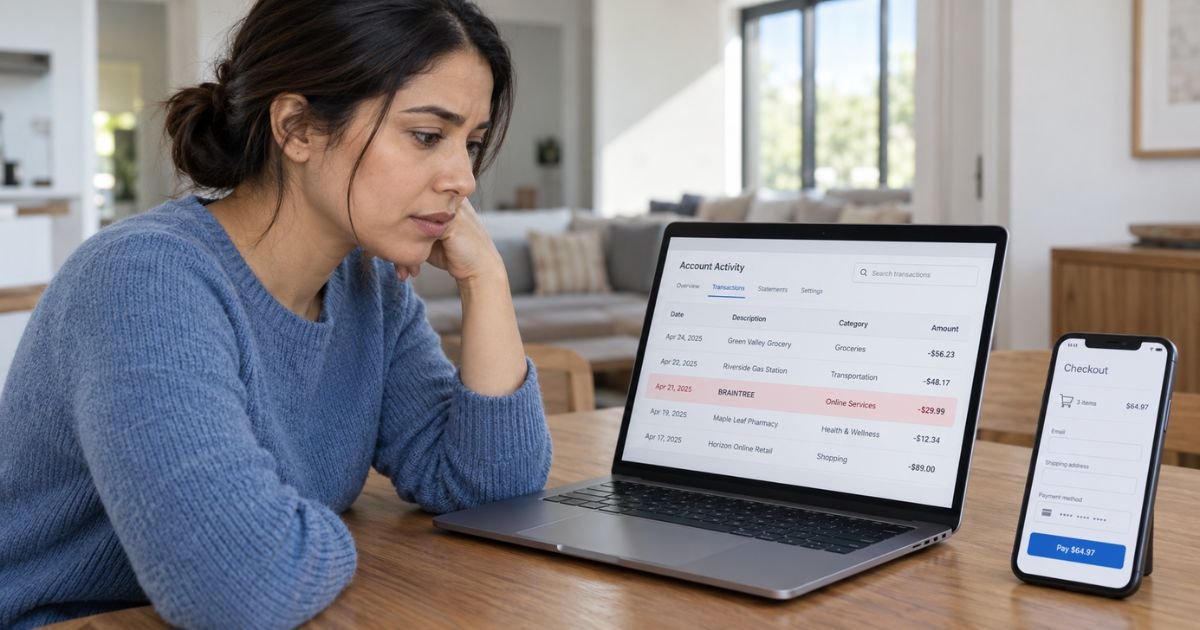
A Braintree charge on credit card can feel confusing if you don’t remember shopping with a company called Braintree. In many cases, Braintree may have processed your payment for another website, app, or subscription.
You should generally look for the actual merchant behind the transaction before assuming the charge is fraudulent. Your purchase receipt, transaction amount, and full statement descriptor can usually provide useful clues.
What Is a Braintree Charge on Credit Card?
A Braintree charge on credit card generally means your payment may have been handled through Braintree, a payment processing platform associated with PayPal. Businesses can use Braintree to accept credit cards, debit cards, PayPal, digital wallets, and other payment methods.
Braintree is generally the payment technology behind the transaction, not necessarily the company that sold you the product. You may therefore remember the store, app, or service name but not recognize Braintree.
The exact statement wording may also depend on the merchant and your bank. Braintree allows merchants to configure billing descriptors, while your bank ultimately determines how that information appears on your statement.
Why Does Braintree Appear on Your Statement?
You may see Braintree because a business you used processes its card payments through Braintree. The actual merchant may operate under a completely different brand name.
For example, you might have purchased a subscription, booked a service, bought an online product, or paid through an app. Braintree may have handled the card transaction in the background.
Your statement might also include the merchant’s own name alongside payment-processing information. You should generally read the complete transaction description rather than focusing only on the word Braintree.
Is Braintree the Company You Bought From?
Usually, not necessarily. Braintree generally provides payment infrastructure to other businesses.
This is similar to seeing the name of a payment processor instead of the retailer you remember. Your actual purchase may have been from an online store, software company, subscription service, travel provider, app, or another business.
You should therefore avoid searching only for “Braintree purchase.” Search your email and order history for purchases matching the same date and amount.
What Types of Purchases Can Use Braintree?
A Braintree payment may generally come from many types of businesses. The platform supports online and mobile payments across a wide range of industries.
Your transaction could potentially relate to:
| Possible purchase | What you should check |
|---|---|
| Online shopping | Recent retailer orders |
| App purchase | Mobile app receipts |
| Subscription | Monthly or annual renewals |
| Software | License or SaaS payments |
| Travel | Booking or reservation charges |
| Delivery service | Food or retail orders |
| Digital service | Membership or online account |
| Marketplace | Purchase from a third-party seller |
The word Braintree alone generally cannot identify which company charged you. You need to match the amount and date to the actual merchant.
How to Identify a Braintree Charge
Start by opening the full transaction details in your bank’s website or mobile app. You should generally look for a merchant name, phone number, website, location, or additional descriptor text.
Braintree supports merchant-specific statement descriptors. A settled transaction may therefore show the business’s own identifying information instead of only Braintree.
Next, search your email for the exact amount. You can also search terms such as receipt, order, subscription, renewal, and payment confirmation.
Compare these details:
| What to compare | What you’re looking for |
|---|---|
| Amount | A matching purchase or renewal |
| Date | An order made near that date |
| Merchant descriptor | A business or product name |
| Email receipt | Confirmation of the purchase |
| Subscription history | A recurring plan |
| Other card users | An authorized purchase |
You should also check any digital wallets connected to your card. A purchase made through an app or saved payment method may be easy to forget.
Could Braintree Be a Subscription Charge?
Yes, it may be. Braintree generally supports recurring billing, which businesses can use for subscriptions and automatic payments.
However, seeing Braintree doesn’t automatically mean you have a subscription. The charge may also represent a one-time purchase.
If the same amount appears every month or year, you should check your active memberships and subscriptions. The company using Braintree usually controls the subscription itself.
Why Is There a $1 Braintree Charge?
A small pending Braintree charge, particularly around $1, may sometimes be a card verification authorization. Braintree’s card verification system can generally use a $0 or $1 authorization to confirm that a card is valid.
A verification authorization is generally temporary rather than a completed purchase. Braintree states that these authorizations may disappear after the bank releases them and should not settle as normal charges.
You should check whether the transaction says pending or posted. If a small verification charge fully posts and remains on your account, you can ask your issuer for more information.
Why Can the Merchant Name Change After the Charge Posts?
A pending transaction may sometimes show different wording from a completed transaction. Braintree distinguishes between temporary soft descriptors and settled hard descriptors.
The pending descriptor may generally appear while the transaction is being authorized. Once the payment settles, your bank may display the merchant’s final descriptor instead.
This means an unfamiliar Braintree reference may disappear or change after a few days. You should generally check the transaction again once it has fully posted.
How to Cancel a Braintree Subscription
You usually cannot cancel a subscription directly with Braintree just because Braintree processed the payment. You generally need to identify the business that sold you the service.
Once you find the merchant, sign in to that company’s website or app. Look for settings such as Subscription, Membership, Billing, Plan, or Automatic Renewal.
Follow the merchant’s cancellation process and save the confirmation. You should generally confirm that the subscription shows as canceled or has an expiration date.
Deleting an app usually doesn’t cancel its billing. Removing your saved card may also not end the underlying agreement.
Can Braintree Refund Your Charge?
Braintree generally processes payments for merchants, so the company that sold you the product or service will usually control refunds. You should first identify and contact that merchant.
Refund eligibility may depend on the merchant’s return or cancellation policy. You should not assume a refund is guaranteed because Braintree appears on the statement.
If you cannot identify the merchant, your card issuer may be able to provide additional transaction information. That information can help you determine who received your payment.
What If You Don’t Recognize the Braintree Charge?
First, check purchases made by anyone authorized to use your card. A spouse, family member, or employee may have used the card with your permission.
You should also review your email receipts, subscriptions, online orders, and digital wallets. Try matching the exact amount rather than relying only on the merchant name.
If you still cannot identify the transaction, contact your card issuer using the number printed on the back of your card. Your issuer may generally have merchant details that aren’t shown in your banking app.
If nobody authorized the payment, tell your issuer that you believe the transaction may be unauthorized. Your bank can generally explain whether you should dispute the charge or replace the card.
Should You Dispute a Braintree Charge?
You may generally dispute the charge if you determine that you did not authorize it. You may also have dispute options if a merchant continued charging you after a valid cancellation.
If you recognize the merchant but disagree with the amount, you should usually contact the merchant first. Keep receipts, cancellation confirmations, and messages that may support your case.
A bank dispute generally doesn’t replace canceling an active subscription. You should stop the recurring billing separately whenever possible.
How to Prevent Another Braintree Charge
Once you identify the merchant, review your account for automatic renewal. Cancel any subscription you no longer want.
Keep the cancellation confirmation and monitor your next statement. The next charge may not use exactly the same descriptor, so you should also watch for the merchant’s own name.
If the original transaction was unauthorized, follow your issuer’s security instructions. Your bank may recommend replacing the card depending on the circumstances.
FAQs On Braintree Charge on Credit Card
Q: What does Braintree mean on my credit card statement?
A: Braintree generally means a merchant used Braintree’s payment technology to process your transaction. You should identify the actual business by checking the full descriptor, amount, and purchase date.
Q: Is Braintree a recurring subscription?
A: Not necessarily. Braintree can generally process both one-time purchases and recurring subscription payments, so you need to identify the merchant behind the charge.
Q: Why do I see a $1 Braintree transaction?
A: A small pending amount may generally be a temporary card verification authorization. You should check whether it disappears or changes after the transaction finishes processing.
Q: What should I do if I never made the Braintree purchase?
A: Check your receipts, subscriptions, and purchases made by authorized card users first. If you still cannot identify the charge, contact your card issuer and ask for the complete merchant details.
Conclusion
A Braintree charge on credit card usually means Braintree processed a payment for another business rather than selling you something directly. You should generally match the amount and date with your recent purchases, subscriptions, and email receipts.
If the transaction remains unfamiliar, ask your issuer for the complete merchant information. If you determine that nobody authorized the payment, you should contact your bank promptly about its dispute and card-security options.
Disclaimer: This article is for general informational purposes only and isn’t financial or legal advice. Merchant, refund, cancellation, and dispute policies may vary by company and card issuer. Verify account-specific questions directly with the merchant or your bank.