What is TM Canada Resale Charge on Credit Card?

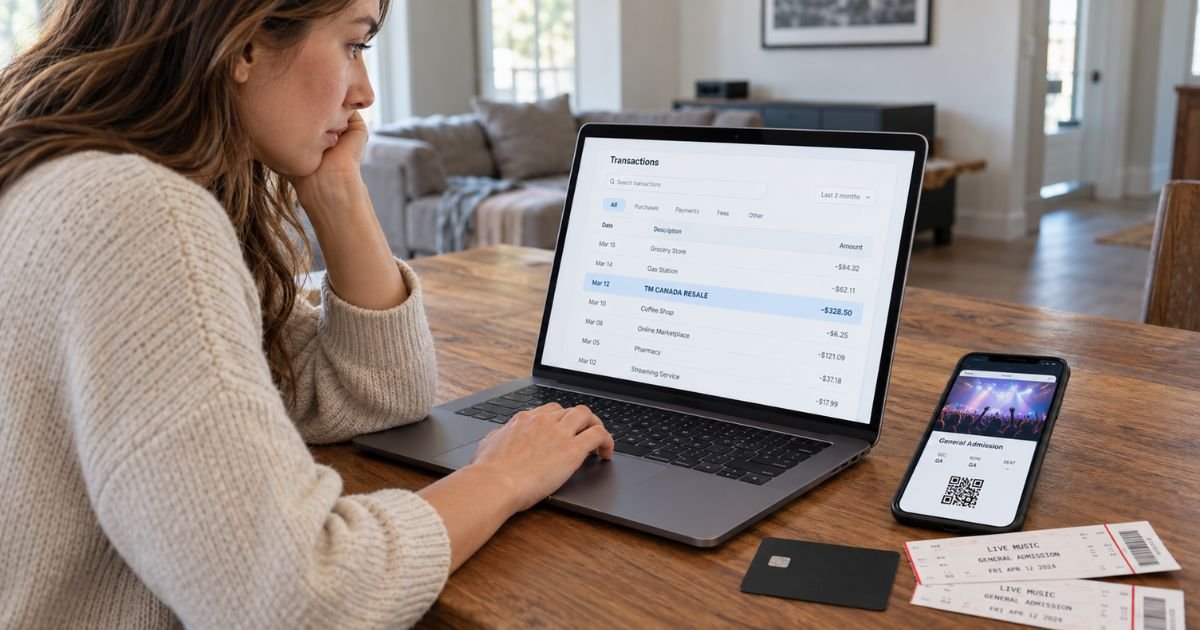
Seeing a TM Canada Resale charge on credit card statements can be confusing, especially when you don’t remember buying tickets from a company with that name. Fortunately, this charge is often connected to a legitimate ticket purchase.
TM Canada Resale typically refers to Ticketmaster Canada’s resale ticket marketplace. This guide explains why the charge appears, how to verify it, and what to do if you need a refund or suspect an unauthorized transaction.
What Is a TM Canada Resale Charge on Credit Card?
A TM Canada Resale charge on credit card statements typically represents a payment for resale tickets purchased through Ticketmaster Canada.
Ticketmaster operates an online marketplace where customers can purchase tickets for concerts, sporting events, theater performances, and other live entertainment.
The transaction description generally means:
- TM: Ticketmaster.
- Canada: Ticketmaster’s Canadian ticketing operation.
- Resale: Tickets previously purchased and listed for sale again by another seller.
Unlike standard tickets sold directly by event organizers, resale tickets are offered by individuals or professional resellers.
Ticketmaster processes eligible resale transactions through its marketplace. For Canadian events, Ticketmaster Canada LP generally handles payment collection from buyers.
The charge may appear even if you don’t recognize the name Ticketmaster in your statement.
However, the descriptor alone doesn’t prove that you authorized the transaction.
Why Does TM Canada Resale Appear on Your Credit Card Statement?
Several situations can explain this charge.
1. Purchasing concert tickets
If you recently bought tickets to a concert in Canada, your purchase might appear as TM Canada Resale.
This is especially likely if you selected tickets marked as resale during checkout.
2. Buying sports event tickets
Ticketmaster also offers resale tickets for eligible sporting events.
Purchases for hockey, basketball, football, and other games may generate this charge.
3. Purchasing tickets from another fan
Ticketmaster allows eligible ticket holders to list their tickets for resale.
If you purchased tickets originally owned by another person, the transaction may use a resale-related billing description.
4. Purchasing multiple tickets
You may see a larger charge if you purchased several tickets in one order.
The total could include ticket prices, applicable taxes, and service fees.
5. Buying tickets for someone else
You might have purchased tickets for a friend or family member.
Check recent gifts, group outings, or event bookings before assuming the charge is unauthorized.
How Does the TM Canada Resale Charge Appear on Your Statement?
The exact merchant description may vary depending on your bank, payment network, and transaction details.
Here are some possible variations.
| Statement description | Possible meaning |
|---|---|
| TM CANADA RESALE | Ticketmaster Canada resale purchase |
| TM CANADA | Possible Ticketmaster Canada transaction |
| TMCANADA | Shortened Ticketmaster Canada descriptor |
| TM RESALE EVENT | Possible Ticketmaster resale transaction |
| TM CANADA RESALE with numbers | Resale payment with a transaction reference |
These descriptions are not guaranteed to appear on every bank statement.
Additional numbers or abbreviations may identify the payment processor, transaction, or merchant location.
If you’re unsure about the description, your credit card issuer may be able to provide additional information.
Is the TM Canada Resale Charge Legitimate?
A TM Canada Resale charge is generally legitimate when it matches a ticket purchase you authorized through Ticketmaster.
However, you should verify any transaction that doesn’t match your records.
Consider whether you recently:
- Purchased concert or sporting event tickets.
- Bought resale tickets through Ticketmaster Canada.
- Purchased tickets for another person.
- Used a saved credit card in your Ticketmaster account.
- Booked tickets for an event taking place in Canada.
If one of these situations applies, the charge may be legitimate.
However, if you haven’t made any ticket purchases and nobody authorized to use your card recognizes the transaction, contact your bank.
An unfamiliar merchant name doesn’t automatically mean fraud, but an unexplained payment deserves investigation.
How to Verify a TM Canada Resale Charge
You can usually begin identifying the charge by checking your Ticketmaster account and recent purchase history.
Step 1: Check your transaction details
Open your credit card statement and locate the TM Canada Resale payment.
Note the transaction date, amount, and any additional merchant information.
Step 2: Review your Ticketmaster account
Sign in to your Ticketmaster account through the official website or mobile app.
Open your upcoming events and order history to look for a matching purchase.
Step 3: Search your email
Ticketmaster generally sends an order confirmation after a successful purchase.
Search your inbox for Ticketmaster, resale tickets, event confirmations, and ticket orders.
Step 4: Compare the final amount
Review your ticket confirmation and compare the total with your credit card statement.
Remember that the final amount may include service fees and taxes.
Step 5: Contact Ticketmaster support
If you find a matching order but have questions about the payment, contact Ticketmaster through its official help center.
Provide your order details and explain the billing concern.
Step 6: Contact your bank
If you cannot find a matching order, ask your credit card issuer for additional merchant details.
Your bank may have information that doesn’t appear in your online statement.
Can You Cancel a TM Canada Resale Charge?
You generally cannot cancel a completed resale ticket purchase simply because you’ve changed your mind.
Ticketmaster’s resale purchases are generally considered final sales. Refunds are typically limited to circumstances covered by the applicable purchase policy or law.
However, your options may depend on the event status and the type of resale ticket purchased.
If your purchase is eligible for a refund, Ticketmaster may provide instructions through your account or by email.
If resale is available for your event, you may also be able to list eligible tickets for sale again.
Keep in mind that selling tickets isn’t the same as canceling your original transaction.
How to Request a Refund for TM Canada Resale
Refund eligibility generally depends on the event organizer’s policies and the circumstances of your purchase.
You may have refund options if an event is canceled, postponed, or rescheduled.
If your event is canceled
Ticketmaster generally provides information about available refunds when an event is officially canceled.
Refunds are typically issued to the original payment method according to the applicable policy.
If your event is postponed or rescheduled
Your tickets may remain valid for the new event date.
Refunds may be available when the event organizer authorizes them or applicable law requires them.
If you can no longer attend
A change in personal plans generally doesn’t qualify you for an automatic refund.
However, you may be able to resell your tickets if the event organizer permits resale.
To check your options:
- Sign in to your Ticketmaster account.
- Open the relevant ticket order.
- Review the event status.
- Look for an available refund request option.
- Follow the instructions provided.
- Save any refund confirmation.
Refund processing times vary depending on the event, payment method, and bank.
Why Was I Charged After Selling Tickets on Ticketmaster?
In certain circumstances, Ticketmaster may charge a seller’s payment card after tickets have already been resold.
For example, if an event is canceled and the resale buyer qualifies for a refund, Ticketmaster may charge the seller’s card on file to reimburse the buyer.
Ticketmaster may then return the original purchase price to the seller’s original payment method, subject to the relevant policies.
Similar arrangements may apply to qualifying refunds for postponed or rescheduled events.
If you previously sold tickets and noticed a new charge, check your Ticketmaster seller account and recent event notifications.
Do not assume the payment is a new ticket purchase without reviewing your seller records.
What Should You Do If You Didn’t Authorize the Charge?
If you don’t recognize the payment after reviewing your ticket orders, contact your credit card issuer promptly.
Explain that you have an unfamiliar TM Canada Resale transaction and request additional merchant information.
If you believe your card was used without permission, your bank may recommend:
- Locking your credit card temporarily.
- Reporting the transaction as unauthorized.
- Requesting a replacement card.
- Filing a formal billing dispute.
- Monitoring your account for further suspicious activity.
For U.S. credit cards, federal billing-error rules generally require you to send a written dispute notice within 60 days after your issuer sends the statement containing the error.
Contact your bank immediately for the correct procedure.
Keep copies of your dispute records and any correspondence with Ticketmaster.
Why Does TM Canada Resale Appear on a U.S. Credit Card?
You don’t need to live in Canada to receive a Ticketmaster Canada charge.
For example, you may have purchased tickets to a concert, festival, or sporting event taking place in Canada.
Ticketmaster Canada can process payments for eligible Canadian event purchases made by customers using U.S. credit cards.
If the transaction is billed in Canadian dollars, your bank may convert the amount into U.S. dollars.
Depending on your card agreement, a foreign transaction fee may also apply.
Check the transaction currency and any separate fees before deciding whether the amount is incorrect.
How to Prevent Unexpected Ticketmaster Charges
You can reduce confusion by keeping records of ticket purchases and monitoring your payment accounts.
Consider these precautions:
- Save ticket confirmation emails.
- Review your Ticketmaster order history regularly.
- Enable credit card transaction alerts.
- Use strong passwords for ticketing accounts.
- Avoid sharing your Ticketmaster login details.
- Check ticket prices and fees before completing purchases.
- Monitor saved payment methods and account activity.
These steps can help you identify legitimate purchases and spot suspicious transactions sooner.
FAQs On TM Canada Resale Charge on Credit Card
Q: What does TM Canada Resale mean on my credit card statement?
A: TM Canada Resale typically refers to a resale ticket purchase processed through Ticketmaster Canada. The payment may relate to concerts, sporting events, or other live entertainment tickets purchased through its resale marketplace.
Q: Is TM Canada Resale a fraudulent charge?
A: Not necessarily. It is commonly associated with legitimate Ticketmaster resale purchases. However, if you don’t recognize the transaction and cannot find a matching ticket order, contact your credit card issuer.
Q: Can I get a refund for a TM Canada Resale charge?
A: Refunds depend on Ticketmaster’s applicable purchase policies, the ticket type, and the event organizer’s rules. Resale purchases are generally final, but certain canceled or rescheduled events may qualify for refunds.
Q: Why am I seeing a TM Canada Resale charge when I live in the United States?
A: You may have purchased resale tickets for an event in Canada through Ticketmaster. Your U.S. card issuer may convert Canadian-dollar purchases into U.S. dollars and apply applicable foreign transaction fees.
Conclusion
A TM Canada Resale charge on credit card statements usually indicates a resale ticket transaction processed through Ticketmaster Canada. It may relate to a concert, sporting event, festival, or another live entertainment purchase.
Start by checking your Ticketmaster account, confirmation emails, and transaction details. If you can’t identify the payment, contact Ticketmaster or your credit card issuer to investigate and protect your account.
Disclaimer: This article is for informational purposes only and does not constitute financial or legal advice. Ticketmaster’s refund policies and credit card dispute procedures may vary by event, purchase type, and card issuer. Verify account-specific questions directly with Ticketmaster or your bank.