What is SGT the Liven Charge on Credit Card Statement?

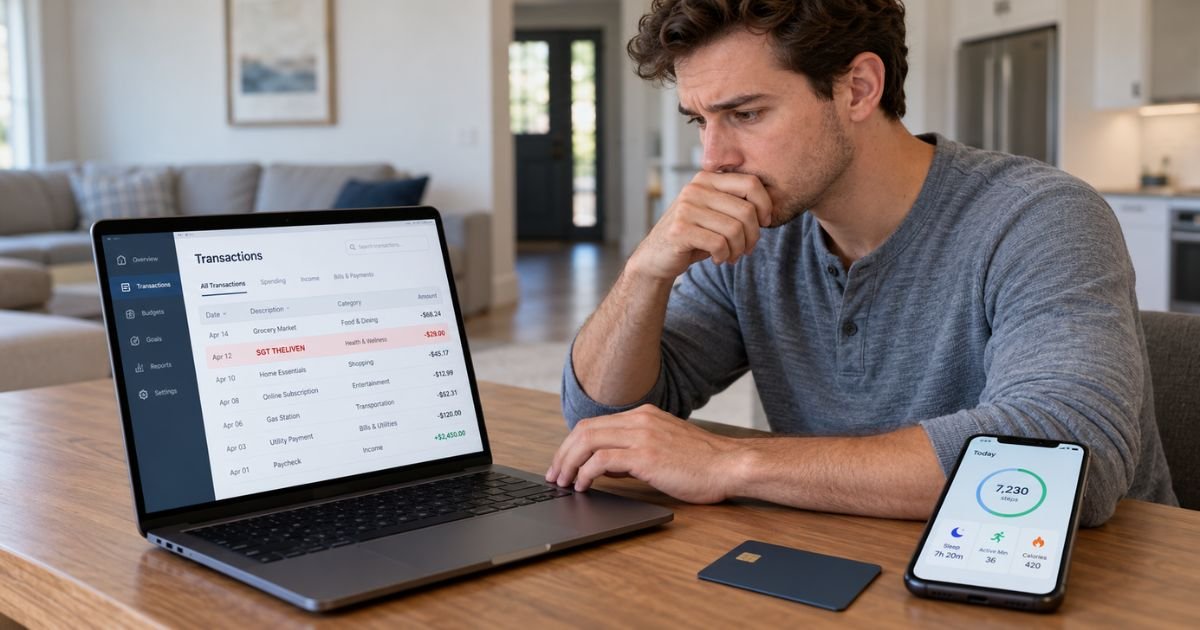
An SGT the Liven charge on credit card can feel confusing if you don’t remember subscribing to anything with that name. In many cases, this charge is connected to Liven, a self-development and wellness app with paid subscription plans.
The wording may appear differently from the app name you remember. You should check your Liven account, email receipts, and app store subscriptions before treating the transaction as unauthorized.
What Is an SGT the Liven Charge on Credit Card?
An SGT the Liven charge on credit card is typically a payment connected to a Liven subscription or purchase. Liven’s official billing information lists descriptors including SGT*theliven, SGT*thelivenx, and several similar variations.
A payment descriptor is simply the merchant wording that appears on your credit card statement. It doesn’t always match the name or logo you saw when signing up.
For example, you may remember using an app called Liven while your statement shows SGT*THELIVEN instead. That difference alone doesn’t generally indicate fraud.
Why Does SGT the Liven Appear on Your Statement?
The charge will generally appear because a Liven subscription or purchase was billed to your card. Liven states that its descriptor may vary depending on the payment provider handling the transaction.
Possible descriptors may include:
- SGT*theliven
- SGT*thelivenx
- theliven
- theliven.com
- STPVtheliven
- SG*theliven
- wellbeingtheliven
- inner-theliven.com
The exact wording may change over time. You should compare the descriptor with your subscription history rather than relying only on the merchant name.
What Is the Liven App?
Liven describes itself as a self-discovery companion. The service generally provides tools and content intended to help users work on habits, emotional well-being, productivity, and personal goals.
You may have reached Liven through its website, mobile app, or an online advertisement. Depending on how you signed up, your subscription may be billed directly by Liven or managed through an app store.
You should check where you originally subscribed. The cancellation method may depend on that purchase channel.
Why Did Liven Charge You Again?
Liven subscriptions generally renew automatically according to the billing cycle selected during signup. A new charge may therefore be a subscription renewal rather than a separate purchase.
Available billing arrangements may vary. Liven currently describes plans that can include weekly, monthly, three-month, or annual billing, as well as certain trial-based offers.
For example, you may have paid a discounted introductory amount and later received a standard renewal charge. The amount and timing should generally have been displayed during checkout.
Could It Be From a Free Trial?
Possibly. Some Liven subscriptions obtained through an app store may include a trial before paid billing begins.
If you didn’t cancel before the trial ended, the subscription may have converted to a paid plan. Liven states that charges are commonly connected to an active subscription or the end of a trial period.
This can make the transaction easy to overlook. You may remember trying the app but not remember agreeing to continued billing.
Check your original confirmation email for the trial length, renewal date, and price.
How to Verify an SGT the Liven Charge
Start by comparing the amount and transaction date with your Liven account. If you have the app, check the membership or subscription section.
You should also search your email for terms such as Liven, theliven, subscription, or membership. Look for purchase confirmations and renewal notices.
You can also compare:
| What to check | What you’re looking for |
|---|---|
| Statement descriptor | SGT*theliven or similar wording |
| Transaction amount | A Liven subscription or purchase |
| Billing date | Your expected renewal date |
| Email receipts | Liven purchase confirmation |
| App Store | Active or previous Liven subscription |
| Google Play | Active or previous Liven subscription |
You should also ask anyone authorized to use your credit card. A family member may have signed up using your payment information.
How to Cancel SGT the Liven Charges
The correct cancellation method generally depends on where you subscribed.
If you subscribed directly through Liven’s website, Liven says you can generally manage the subscription through Settings > Membership in the app. Canceling should stop future renewals while leaving access available until the current paid period ends.
If you subscribed through Apple, you should generally manage the subscription through your Apple subscription settings. If you subscribed through Google Play, use your Google Play subscription settings.
Deleting the Liven app usually isn’t the same as canceling a subscription. You should confirm that the subscription itself shows as canceled.
Will Removing Your Credit Card Stop Liven Billing?
You shouldn’t rely on deleting or replacing a saved card as your main cancellation method. A recurring subscription should generally be canceled through the service or app store where you purchased it.
Removing the app from your phone also typically doesn’t cancel billing.
Use the subscription management option first. Keep any cancellation confirmation email or screenshot in case another charge appears.
How to Request a Refund
A refund isn’t guaranteed simply because you forgot about a renewal. Eligibility may depend on how you subscribed, the transaction circumstances, and the applicable refund policy.
If the payment was made directly to Liven, you can generally contact Liven support and ask it to review the charge. Explain the amount, transaction date, and reason you believe a refund is appropriate.
If Apple or Google processed the purchase, refund requests may generally need to go through the relevant app store.
Keep your subscription confirmation and cancellation records. They may be useful if there is disagreement about when you canceled.
What If You Don’t Recognize SGT the Liven at All?
First check whether you previously completed a Liven quiz, trial, or subscription signup. A service you briefly tested may be easier to forget than a regular purchase.
Search all email addresses you commonly use. You should also check Apple and Google subscription histories.
If nobody authorized to use your card recognizes the payment and you can’t find a Liven account connected with it, contact your card issuer.
Use the official number on the back of your card or your bank’s secure app. Your issuer may have additional merchant information that doesn’t appear on your statement.
Should You Dispute the Charge?
You may consider a dispute if the transaction wasn’t authorized or if you canceled correctly and continued to be charged.
If you recognize the subscription but simply forgot about the renewal, contacting Liven first may generally be the easiest option. A bank dispute doesn’t automatically cancel an active subscription.
If you believe your card details were used without your permission, contact your issuer promptly. Your issuer may recommend replacing the card or taking other security measures.
Dispute deadlines and procedures vary by issuer. You shouldn’t delay contacting your bank when you believe a charge is genuinely unauthorized.
How to Prevent Another SGT the Liven Charge
Confirm that your subscription status shows as canceled. Don’t assume deleting the app means billing has ended.
Save your cancellation confirmation. You should also watch your next one or two statements for another Liven descriptor.
Remember that the wording may not always be exactly SGT*theliven. Liven publishes several possible descriptors, including variations containing theliven, wellbeing, and inner-theliven.
If another charge appears after a confirmed cancellation, contact the company and your card issuer as appropriate.
FAQs On SGT the Liven Charge on Credit Card
Q: What does SGT the Liven mean on my credit card?
A: It typically identifies a payment associated with the Liven app. Liven officially lists SGT*theliven and SGT*thelivenx among the descriptors that may appear on bank or card statements.
Q: Is SGT the Liven a recurring subscription?
A: It may be. Liven offers subscription plans that generally renew automatically based on the billing period selected during signup.
Q: How do I stop SGT the Liven charges?
A: Cancel the Liven subscription through the service you used to subscribe. Direct Liven subscriptions can generally be managed through the Membership settings, while Apple or Google purchases should generally be managed through the appropriate app store.
Q: What if I never signed up for Liven?
A: Check your email, app store subscriptions, and purchases made by anyone authorized to use your card. If you still can’t identify the transaction, contact your card issuer and report that you don’t recognize it.
Conclusion
An SGT the Liven charge on credit card is typically associated with a subscription or purchase from the Liven app. The merchant descriptor may appear as SGTtheliven, SGTthelivenx, or another similar variation.
Check your Liven membership, email receipts, and app store subscription history first. If the charge remains unfamiliar or continues after cancellation, contact Liven and your card issuer for account-specific help.
Disclaimer: This article is for general informational purposes only and isn’t financial or legal advice. Subscription, refund, cancellation, and dispute policies may vary by company and card issuer. Verify account-specific questions directly with Liven or your bank.