What is Adobe Charge on Credit Card?

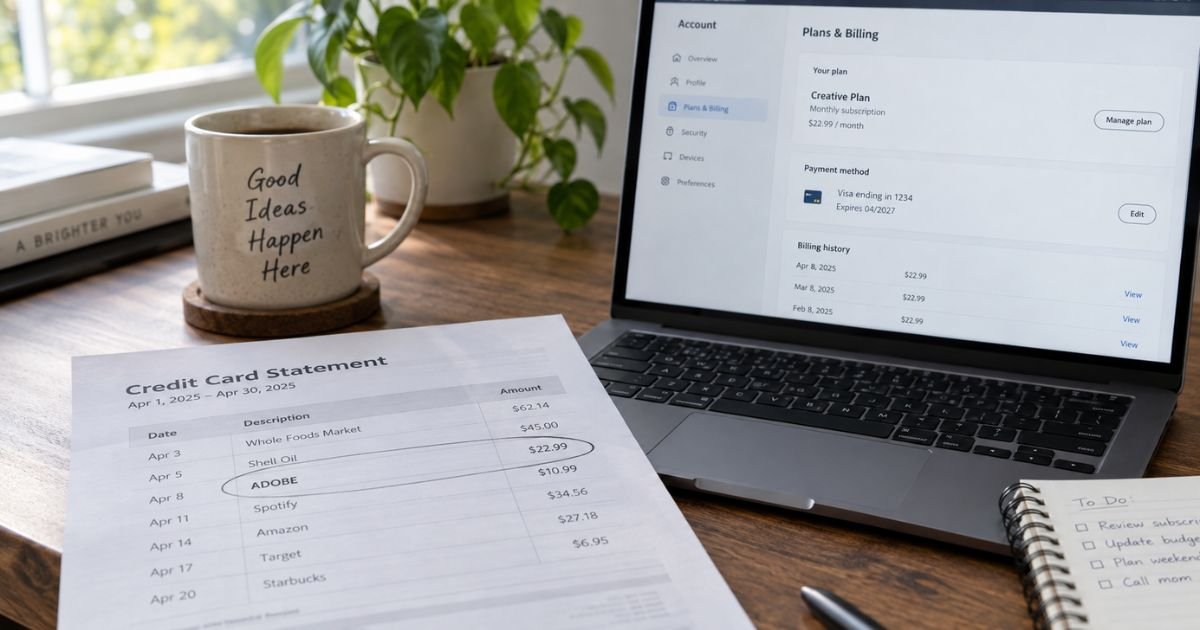
An Adobe charge on credit card can feel confusing if you don’t recall signing up for anything. That line is often a real Creative Cloud, Acrobat, or Stock bill under a short name. This guide shows how to identify the plan and how to cancel it if you do not want it.
What an Adobe charge on credit card usually is
An Adobe charge on credit card is typically a payment to Adobe for software or digital content. Most people see it for a subscription that renews on its own. Common products include Creative Cloud apps, Acrobat PDF tools, Adobe Stock, and Express.
Adobe’s help pages say card statements often show the word ADOBE plus a transaction ID. Your bank may cut that text to ADOBE, ADOBE*, or ADOBE SYSTEMS. The short name identifies the company. It does not always name the exact app.
Adobe also runs an official Charge Finder for card payments that list ADOBE. You enter details from the statement. The tool can show the email on the account, the product name, the invoice, and the charge type. New charges can take up to 48 hours to appear there.
How the charge shows on your statement
Banks limit merchant text. That is why Photoshop or Premiere may not appear in full. Match the date and amount first. Then use Charge Finder or your Adobe Plans page.
| Statement wording you may see | What it often points to |
|---|---|
| ADOBE or ADOBE (transaction ID) | General Adobe card billing |
| ADOBE *CREATIVE CLOUD or ADOBE CREATIVE | Typically a Creative Cloud plan |
| ADOBE *ACROBAT, ACROPRO, or similar | Often Acrobat or a PDF plan |
| ADOBE *PHOTOSHOP or photography wording | Often Photoshop, Lightroom, or a photo plan |
| ADOBE *STOCK | Stock credits or a Stock plan |
| PAYPAL *ADOBE | Adobe billed through PayPal, not the card Charge Finder |
PayPal and app-store bills are different. Adobe’s Charge Finder FAQ says the tool works only for credit or debit charges that show ADOBE. If you bought through Apple, Google, or Microsoft, that store’s statement name may appear instead.
A pending authorization can post, change, or drop. Wait for the settled amount before you treat the figure as final.
Why the amount may not match what you remember
Adobe sells more than one plan type. Some plans are month to month. Some are annual and prepaid. Some are annual and billed monthly. That last option looks like a monthly charge, but it is still a yearly commitment.
Adobe’s own cancellation examples for North America have used a Creative Cloud Pro monthly figure of US$69.99 on an annual plan billed monthly. Public plan pages also list other tiers, including Creative Cloud Standard and single-app plans.
Promos, student rates, tax, and older prices can change the number on your card. Confirm the live price on your Plans page. Do not treat any one dollar amount as proof of fraud.
Adobe help lists common reasons a bill looks high. A prior payment may have failed, then Adobe retried and collected more than one period. A promotional or student price may have ended.
A list price in your region may have gone up after an email notice. You may have two Adobe IDs under different emails. You may have bought Stock credits or a second app on top of Creative Cloud.
Annual plans billed monthly can also add an early termination fee if you cancel after the first window. Adobe’s subscription terms say that fee is generally 50% of the remaining contract balance after 14 days. The cancel screen shows the number that applies to your plan.
How to match the charge to your Adobe account
Start with Adobe’s Identify your Adobe charge page if the statement says ADOBE. Have the last four digits of the card, the expiration date, the transaction date, the exact amount, and the currency. Enter them as they appear on the statement.
Then sign in at account.adobe.com. Try every email you use for work, school, and old personal accounts. Open Plans and payment. Open billing history and download the invoice that matches the date.
Check whether someone in your household uses Photoshop, Premiere, Acrobat, or Express on a shared computer. A teammate or family member can save your card on their Adobe ID. Ask before you dispute.
If Charge Finder finds nothing and the charge is older than a few months, Adobe’s community notes say the tool generally covers recent card charges. In that case, use billing history inside each Adobe ID, or contact Adobe through the official help page after you type the address yourself.
How to cancel an Adobe plan
If you bought directly from Adobe, sign in at account.adobe.com/plans. Select Manage plan for the plan you want to stop. Select Cancel your plan and follow the prompts. Adobe says you should get an email confirmation. Also check the Plans page so the status actually changed.
Adobe says you cannot cancel while a payment is processing or while a payment problem is open. Wait 24 hours and try again. If you have more than one plan, cancel each one. Stopping Creative Cloud does not automatically stop Acrobat, Stock, or Express.
Adobe’s cancel help says most plans get a full refund if you cancel within 14 days of the initial purchase. After that, the result depends on the plan. A true month-to-month plan generally stops at the end of the period you already paid. An annual plan billed monthly may show a cancellation fee on the confirm screen. Read that screen before you tap Confirm cancellation.
If you bought through Apple, Google, or Microsoft, Adobe says that store owns the subscription. Cancel in that store’s subscription settings. Changing the card on file at Adobe will not stop an App Store or Play Store renewal.
After you cancel, paid app access generally continues until the current billing period ends. Your Adobe ID typically stays open with free membership limits. Export files you need before storage or app access drops.
If you do not recognize the Adobe charge
Search email for “Adobe,” “Creative Cloud,” “receipt,” and “renewal.” A free trial that converted is a frequent cause. Adobe generally keeps a payment method on file when the trial starts.
If Charge Finder and every Adobe ID you know still show nothing, treat the charge as unrecognized. Call the number on the back of your card. Ask the issuer to identify the merchant of record. Request a replacement card if nobody authorized the sale.
Then send a written billing-error notice. The CFPB says you generally must get that written notice to the issuer within 60 calendar days after the statement that first showed the charge. Call first, then follow up in writing.
During a timely written credit card dispute, you typically do not have to pay the disputed amount while the issuer investigates. The issuer generally must acknowledge the notice within 30 days unless it already fixed the bill. It generally must finish within two billing cycles, and not later than 90 days.
Do not use a “refund” phone number from a search ad. Adobe’s community also says Adobe will not ask for your password or full card number in a private message.
FAQs On Adobe Charge on Credit Card
Q: Is an Adobe charge on credit card always Creative Cloud?
A: No. Acrobat, Stock, Express, a single app, or a team license can all bill as Adobe. Use Charge Finder or Plans and payment to see the product name. Do not guess from the word ADOBE alone.
Q: Why did Adobe charge me a large amount when I tried to cancel?
A: You may be on an annual plan billed monthly. Adobe’s terms generally allow a 14-day refund window on many new purchases. After that, an early termination fee of 50% of the remaining yearly balance can apply. The cancel page shows the fee before you confirm.
Q: Can I use Adobe Charge Finder if I paid with PayPal?
A: Adobe’s Charge Finder FAQ says no. That tool is for card payments that show ADOBE on the statement. For PayPal, sign in to PayPal and to account.adobe.com, or contact Adobe Support through the official help site.
Q: How do I stop the next Adobe charge?
A: Cancel each plan at account.adobe.com/plans if you bought from Adobe. Cancel in Apple, Google, or Microsoft settings if you bought there. Watch the next statement. Replace the card only after you cancel, or a stored number on another Adobe ID can still bill.
Conclusion
An Adobe charge on credit card is typically Adobe billing a saved card for Creative Cloud, Acrobat, Stock, or a related plan. Use Adobe’s Charge Finder and your Plans page to match the invoice before you panic.
If the plan is not yours, cancel on Adobe’s official account site and work with your card issuer on any unauthorized amount.
Disclaimer: This article is for general information only. It is not financial, legal, or tax advice. Adobe prices, refund rules, cancellation fees, and statement names can change, and card issuer policies vary. Confirm plan details, fees, and cancellations with Adobe and with the bank that issued your card.