What is Apple Digital Services Charge on Credit Card?

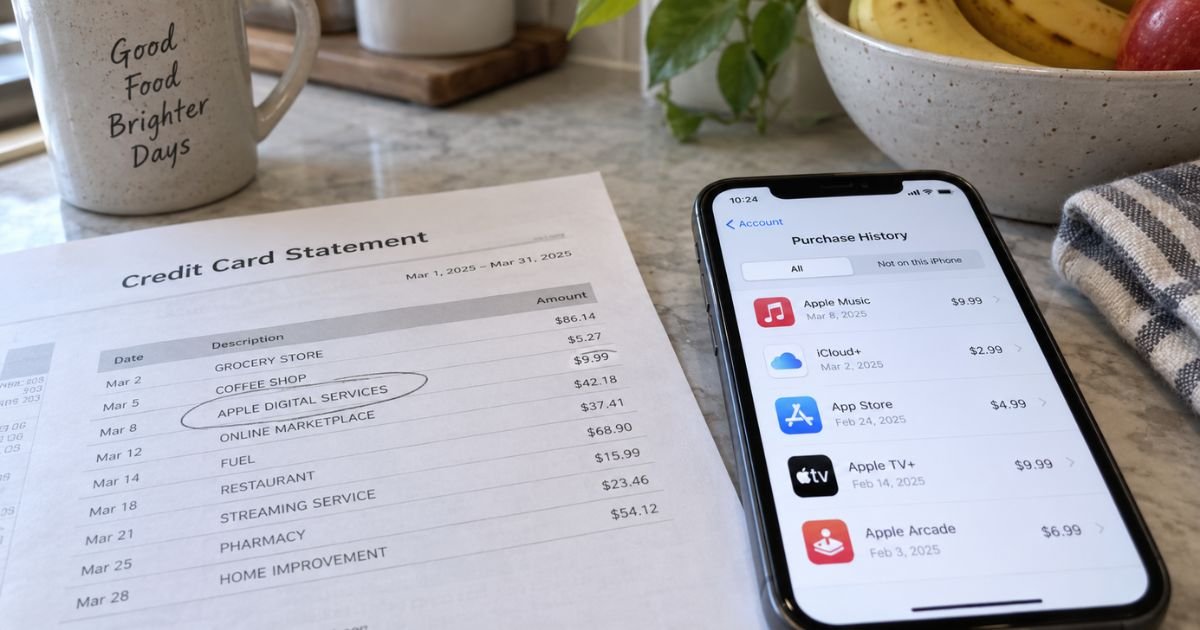
An Apple Digital Services charge on credit card can feel confusing if you don’t recall signing up for anything. That line is often Apple billing apps, iCloud, music, or a family purchase under a short name. This guide shows how to match the charge and how to stop the next one.
What an Apple Digital Services charge on credit card usually is
An Apple Digital Services charge on credit card is typically Apple billing your saved payment method for digital content. Official Apple help describes the same family of charges as apple.com/bill or Apple Services. Your bank may print Apple Digital Services instead of the exact product name.
Apple says apple.com/bill appears when you buy an app, music, a movie, or other Apple content. It also appears when a subscription renews. It can appear when a family member buys through Family Sharing.
That bucket is broad. It can include App Store apps, in-app purchases, Apple Books, Apple TV rentals or buys, Apple Music, Apple TV+, iCloud+, Apple Arcade, Apple News+, Fitness+, Apple One, or a third-party app that bills through Apple. The statement line usually will not list every item.
Apple also says several purchases can land in one larger charge. The total on your card may not match a single $0.99 app. Open the receipt date in purchase history to see the grouped items and tax.
How the name shows up on your statement
Issuers shorten merchant text. Cupertino, CA may appear because that is Apple’s billing location, not because you shopped there in person.
| Wording you may see | What it often points to |
|---|---|
| APPLE DIGITAL SERVICES or Apple Services | Typically digital content or a subscription billed by Apple |
| apple.com/bill or APPLE.COM/BILL | Official Apple wording for apps, media, and renewals |
| itunes.com/bill or APL*ITUNES | Older iTunes-style digital billing |
| APPLE STORE #R and a city or store number | Usually a retail Apple Store visit, not the digital bill |
| APPLE.COM/US | Often the Apple online store for hardware or accessories |
A small pending amount can appear when you add or update a card on your Apple Account. That hold is generally not the final posted purchase. Wait for the settled line before you treat the amount as final.
This digital bill is not the same as an Apple Card payment to Goldman Sachs. It is also not Apple Cash sending money to a person. Those use different statement names.
Why the amount looks random
Apple charges at the time of purchase or within a few days. Several apps, a movie, and a subscription renewal can share one posted total. That is why the dollar amount can look unfamiliar even when every item is real.
Apple attempts to use your Apple Account balance first. If that balance cannot cover the full amount, Apple charges your primary payment method. If that card fails, Apple may try other cards on the account from top to bottom. Family Sharing can send a child’s purchase to the organizer’s card when Purchase Sharing is on.
Tax and local pricing can change the number from the price you remember in the App Store. Match the date range, not only one listed price.
How to see exactly what Apple billed
Go to reportaproblem.apple.com and sign in with your Apple Account. Apple’s help page says to tap or click the purchase date to see the full receipt, including tax. If Family Sharing is on, use the Apple Account menu to view a family member’s purchases.
On iPhone or iPad, you can also open Settings, tap your name, then Media & Purchases or Subscriptions, and open Purchase History. Search the email on that Apple Account for “receipt from Apple” or “invoice from Apple.” Check junk mail.
If you have more than one Apple Account, sign in to each one. An old iCloud email, a work iPad, or a child’s old ID can hold the subscription. Ask anyone who knows your card number.
Apple Card users can open Wallet, tap Apple Card, then tap the Apple Services line twice for item detail. Apple says the PDF statement may still show apple.com/bill or itunes.com/bill.
How to cancel and request a refund
To stop a renewal, open Settings, tap your name, then Subscriptions. Tap the plan and tap Cancel Subscription. You may need to scroll to find the button. If you see red expiration text and no Cancel button, Apple says the plan is already canceled.
You can also manage plans at account.apple.com. Cancel each subscription you do not want. Apple One does not remove every extra iCloud+ upgrade by itself. Review iCloud+ separately if you pay for more storage than the bundle includes.
If you subscribed to Apple Music or Apple TV through Google Play on Android, cancel in Google Play when that store owns the bill. Changing the card on your Apple Account will not stop a Google Play renewal.
Apple says App Store and iTunes purchases may be eligible for a refund. Request one at reportaproblem.apple.com by choosing Request a refund. A refund is not guaranteed. Approval generally depends on the item and Apple’s review.
If you cancel iCloud+, download or delete files that will not fit the free storage limit before the paid period ends. Apple says the change typically takes effect after the current billing period.
If you still do not recognize the charge
If reportaproblem.apple.com shows nothing that matches the date and amount, try every Apple Account you have used. Ask household members who share the card. Then contact Apple Support through support.apple.com after you type the address yourself.
If Apple cannot tie the charge to any account you control, call the number on the back of your card. Ask the issuer to identify the merchant of record. Request a replacement card if the sale was not authorized.
Then send a written billing-error notice. The CFPB says you generally must get that written notice to the issuer within 60 calendar days after the statement that first showed the charge. Call first, then follow up in writing.
During a timely written credit card dispute, you typically do not have to pay the disputed amount while the issuer investigates. The issuer generally must acknowledge the notice within 30 days unless it already fixed the bill. It generally must finish within two billing cycles, and not later than 90 days.
Do not call a “refund hotline” from a search ad. Use reportaproblem.apple.com or the number on your card.
FAQs On Apple Digital Services Charge on Credit Card
Q: Is an Apple Digital Services charge on credit card always a subscription?
A: No. It can be a one-time app, in-app purchase, movie, book, or several of those grouped together. Open the purchase date at reportaproblem.apple.com to see each line. Cancel only the subscriptions you no longer want.
Q: Can a family member put this charge on my card?
A: Yes, if Purchase Sharing is on in Family Sharing, or if someone saved your card on their Apple Account. Apple’s help page tells you to check family purchases and any shared card. Ask the household before you dispute.
Q: Why doesn’t the card amount match one App Store price?
A: Apple often groups several purchases and renewals into one posted charge, including tax. The card total can cover more than one day of activity. The receipt behind the purchase date is the itemized list.
Q: How do I stop another Apple Digital Services charge?
A: Cancel each plan in Settings, then Subscriptions, or at account.apple.com. Remove the card from Apple Accounts you do not use. Watch the next statement. Replacing the card stops that number, but a second card on file can still bill.
Conclusion
An Apple Digital Services charge on credit card is typically Apple billing apps, media, iCloud, or a subscription under a short digital-services name.
Match the date at reportaproblem.apple.com before you assume fraud. If the items are not yours, cancel in Subscriptions and work with Apple Support or your card issuer.
Disclaimer: This article is for general information only. It is not financial, legal, or tax advice. Apple billing labels, refund decisions, and subscription rules can change, and card issuer policies vary. Confirm charges, cancellations, and refunds with Apple and with the bank that issued your card.