What is Amazon Marketplace Charge on Credit Card?

An Amazon Marketplace charge on credit card can feel confusing when you don’t remember buying anything under that exact name. Unfamiliar statement labels are often legitimate, but you should verify the payment before deciding what it means.
This guide explains the most likely connection, the records to check, and the steps you can take to stop, correct, or dispute a charge that does not belong to you.
What Is an Amazon Marketplace Charge on Credit Card?
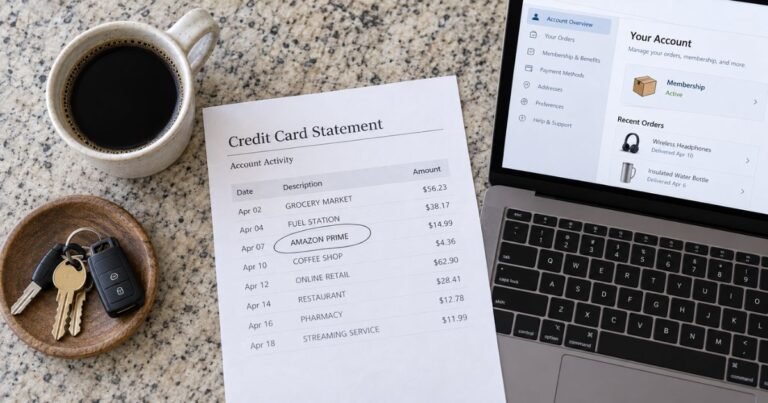
Amazon Marketplace is a billing description commonly used for purchases on Amazon’s online store, including orders fulfilled by third-party sellers. A shortened entry such as AMAZON MKTPLACE may not show the product or seller name.
A merchant descriptor is the short billing name your bank shows instead of a full receipt. The exact wording can vary across card issuers, payment processors, and locations. A possible match is not proof that a specific transaction was authorized.
Why Amazon Marketplace May Appear on Your Statement
You ordered goods from Amazon or a seller on Amazon Marketplace. Check the original receipt and the account used at checkout before assuming this is the cause.
A shipment or order part was charged at a different time than checkout. The amount may match even if the seller name on your receipt looks different.
A household member ordered items using a shared Amazon account. An authorized purchase can be unfamiliar to the main cardholder when payment details are shared.
A separate seller or split shipment produced another entry. If no record matches, ask the issuer for the full merchant identity rather than guessing.
How to Identify the Exact Amazon Marketplace Payment
Start with the full statement entry, not just the words Amazon Marketplace. Copy the amount, currency, date, and whether the entry is pending or completed. Keep your last four card digits for your own records.
For related but distinct purchases, compare Amazon Downloads and Amazon Bookstore. To match order payments and shipping-related charges, review Amazon’s Your Transactions page while signed in.
Compare the transaction with receipts and online account histories for several days around the posting date. A business may charge after the purchase date, and your bank may show a different date from the seller.
Use the checks that matter for this label: Compare the statement total with Your Orders and Your Transactions. Check orders split into multiple shipments or combined purchase totals.
If you are still unsure, continue with these checks: Review household Amazon accounts and stored cards. Ask Amazon support to trace the amount if your order history does not match. Ask the issuer for more merchant information rather than relying on a search-result guess.
If a household member or employee is allowed to use the card, ask whether they recognize the transaction. Do this privately and without sharing your account number or login credentials.
What the Date and Amount Can Tell You
The purchase date and the posting date are not always the same. A payment may remain pending while a merchant finishes processing it. Compare the final posted amount before treating two entries as separate sales.
Several items purchased together can generate separate transactions when they ship, and returns may arrive as later credits. A descriptor saying Marketplace does not prove that a specific third-party seller was paid.
Look at the currency and any extra wording beside the merchant label. Foreign transaction fees, taxes, or separate service charges can affect what you ultimately pay. Do not assume the difference has a particular cause without the receipt.
Can You Cancel Future Amazon Marketplace Charges?
First determine whether this was a one-time payment or an ongoing arrangement. A recurring date may suggest a subscription or automatic payment, but only your account records or the seller can confirm that arrangement.
Do not confuse an authorization hold with a completed purchase. Confirm that the questioned amount has posted before treating it as a second sale. Check the seller’s verified account or billing settings for any recurring-payment instructions.
If an ongoing payment is legitimate and no longer wanted, cancel it using the official service’s instructions. Save the cancellation confirmation and effective date. Removing an app, closing a browser tab, or replacing a card may not end a contractual obligation.
How to Ask for a Refund or Billing Correction
If you recognize the business but the amount is wrong, check your receipt first. Explain the difference to the seller and ask for a written correction or refund review. Include the transaction date and a reference number rather than your full card number.
A refund is not automatic just because the statement name looks unfamiliar. The merchant’s terms, the reason for the request, and consumer-protection rules can affect what happens. Keep any confirmation of an approved refund.
If the product was not delivered, a service failed, or a payment was duplicated, document the problem clearly. Contact the operator or company responsible for the sale when you can identify it. Ask your bank what options remain if the seller cannot resolve it.
What to Do if You Did Not Authorize the Charge
If no account or authorized user explains the payment, report it promptly to the card issuer. Use the number printed on your card or the bank’s official app. Ask whether your card should be locked or replaced.
Review other recent transactions for small test charges or unfamiliar recurring payments. Update passwords and enable extra login protection where needed. Never give a one-time banking code to someone claiming to investigate your statement.
You can request a dispute even when the seller uses a legitimate business name. The bank will investigate the actual transaction and authorization details. Keep the date you reported it and any case reference you receive.
How Credit Card Disputes Generally Work
For many U.S. credit-card billing errors, you may need to send a written dispute within 60 days after the issuer sent the first statement showing the error. A phone call or app report is useful, but may not preserve every federal billing-error right. Follow the dispute-address instructions on your own statement.
While a qualifying billing-error dispute is reviewed, keep paying the amounts you do not contest. The issuer may ask for receipts or correspondence, and a temporary credit is not always a final refund. If your card is Canadian or from another country, the applicable rules and deadlines can differ.
Mistakes to Avoid When Checking Amazon Marketplace
Do not decide that a payment is fraudulent solely because the statement shows a different name. Likewise, do not assume it is safe because a company with that name exists. Compare the amount, date, merchant identity, and your own records.
Avoid posting complete statement screenshots in public forums. Cover card numbers, account references, addresses, and other private details. Use verified customer-service contacts rather than phone numbers offered by unknown charge-lookup sites.
FAQs On Amazon Marketplace
Q: Is a Amazon Marketplace charge automatically fraudulent?
A: No. The name may identify a legitimate merchant or payment processor. Match a receipt, account record, amount, and date before concluding what happened.
Q: Can a Amazon Marketplace charge be a subscription?
A: That depends on the transaction. Look for recurring dates and check the seller’s account settings. A single unfamiliar entry does not establish an ongoing membership.
Q: How can I find the exact Amazon Marketplace purchase?
A: Review your orders and payment emails, check authorized users, and ask the issuer for additional merchant details. The short descriptor is often incomplete.
Q: What should I do if I never approved it?
A: Call the issuer using the official number and report the transaction promptly. Ask about securing the card and the appropriate dispute process.
Conclusion
A amazon marketplace charge on credit card records should be judged by its details, not by its name alone. Check the statement, your receipts, and the related account before taking action.
If the entry is wrong or unauthorized, contact the relevant company or card issuer promptly. Keep proof of your questions and any correction or cancellation.
Disclaimer: This article is for general information only, not financial or legal advice. Policies and rights may vary by card issuer and location. Confirm account-specific questions with the company or your bank.